How to Identify and Remove Duplicate Computers
Overview
This article explains how to identify and remove duplicate computers in Netwrix Endpoint Protector. Duplicate endpoints can occupy additional licenses, removing them helps free up licenses for other systems.
Instructions
- In the Netwrix Endpoint Protector Console, navigate to the Device Control menu and select Computers.
- In the Filters section, select Duplicates > Yes > Apply.
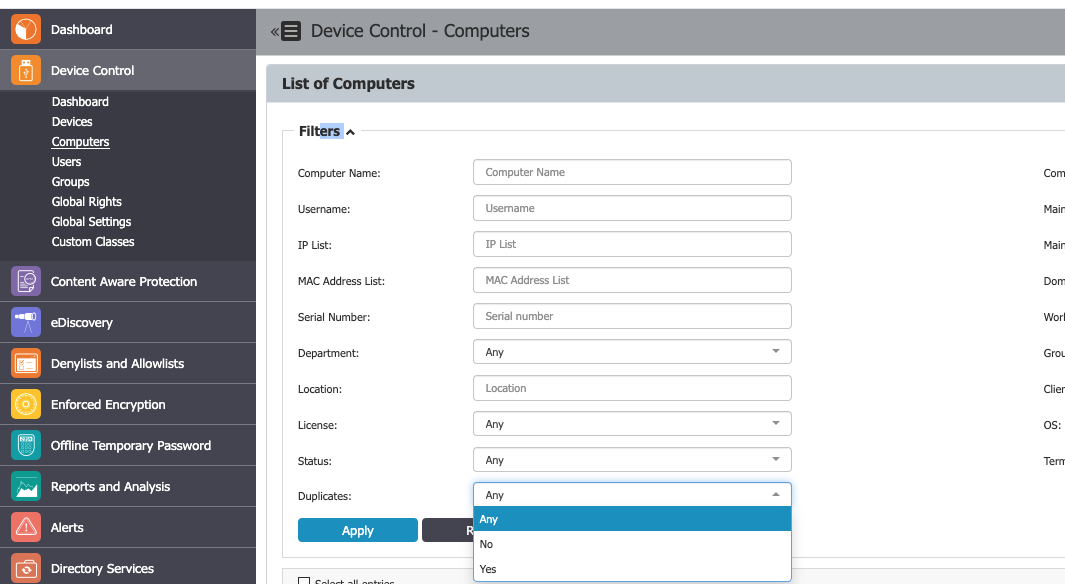
- Review the list of duplicate computers. You can further filter for Licensed and Offline computers.
- Delete the unwanted duplicate entries to release the associated licenses.