Deploying Endpoint Protector Agents
Overview
This article explains how to deploy Endpoint Protector agents to endpoint systems. You should deploy agents before modifying policies to perform blocking. This approach allows you to identify any system variables that may require allowances and gives you an opportunity for end-user feedback.
For the full reference, see Client Software.
Only the latest Endpoint Protector and Enforced Encryption Clients are available for download from Client Software. If you're deploying to endpoints still running client version 5.9.4.1 or older, they can't receive the latest client package directly — you must deploy the 5.9.4.3 Hotfix 1 signature bridge client first. See Client Upgrade Management for the full certificate bridge explanation and required package list.
Instructions
-
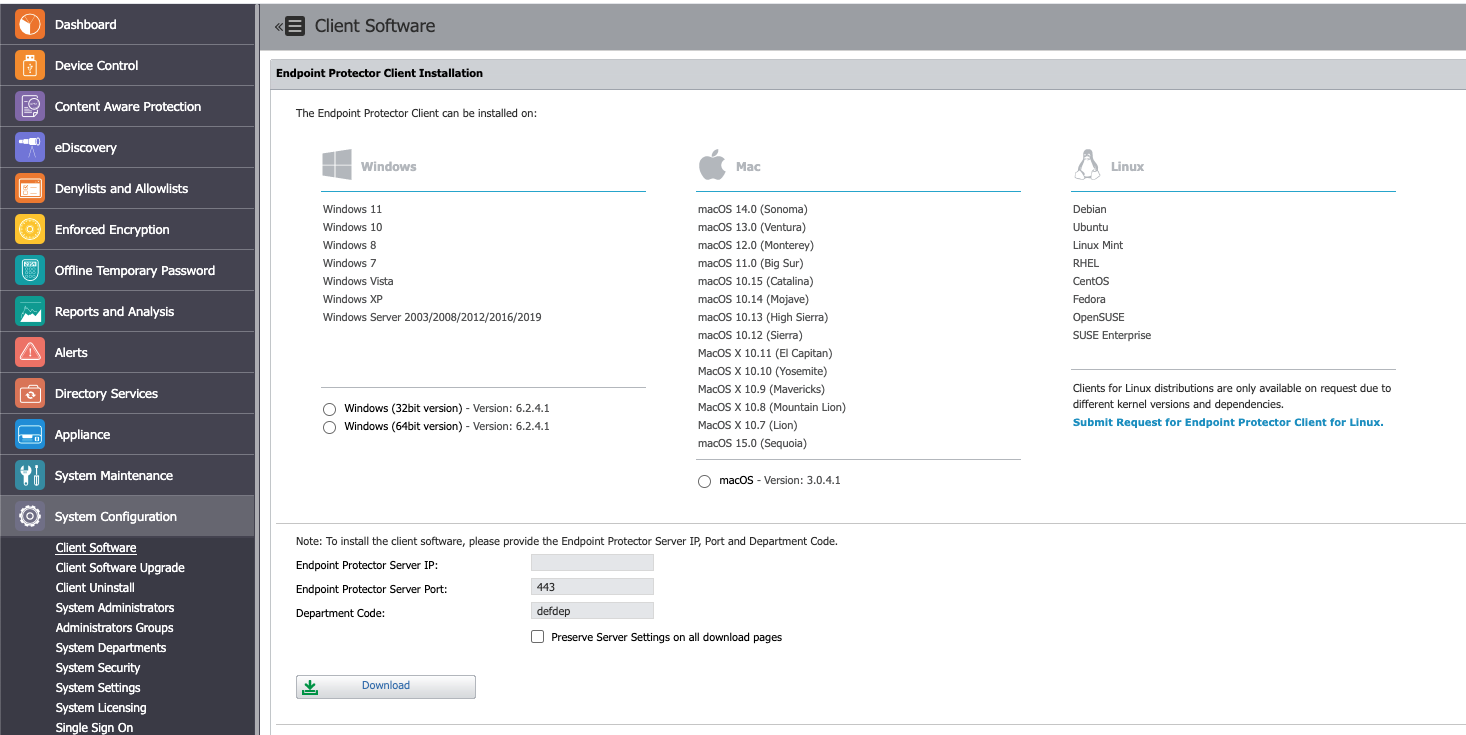
Retrieve the Endpoint Protector Client package(s) from the Endpoint Protector Management Console under System Configuration > Client Software.
-
For Windows, select the add-ons that align with your blocking strategy. You can choose any combination of add-ons, or none at all.
-
Download the package and begin deployment using your preferred deployment tool.
-
For macOS installations, provide Full Disk Access after installation: I. Navigate to System Preferences > Security & Privacy > Privacy tab > Full Disk Access.
II. Locate the Endpoint Protector Client, check the application, and save the changes.