Managing Network Share Rights in Device Control
Overview
Network Shares allow users to access shared folders and files over a network. In Endpoint Protector, you can manage access rights for Network Shares through the Device Control module, alongside other removable devices and peripheral ports. This feature is currently supported on Windows and macOS platforms.
This article explains how to locate and modify rights for Network Shares at the global, group, computer, or user level. It also outlines the specific permissions and restrictions that apply to Network Shares, which differ from those for other device types. Use these instructions to help secure your organization’s data while providing appropriate access to shared network resources.
Instructions
- In the Endpoint Protector Console, navigate to Device Control > Global, Group, Computer, or User Settings > Select Item > Manage Rights.
If you configure device rights granularly for all entities, the priority order is as follows, starting with the highest:
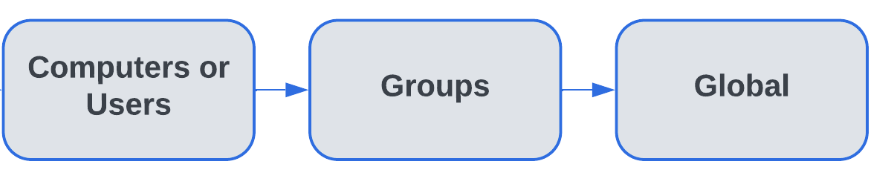
If global rights indicate that no computer on the system has access to a specific device, and for one computer that device has been authorized, then that computer will have access to that device.
Network Share Behavior
The intended behavior of a Network Share is slightly different from other devices with the same rights. Network Shares include the following permissions:
- Files can be viewed on the Network Share.
- Files can be copied from the Network Share.
- Files cannot be deleted from the Network Share.
- Files cannot be renamed on the Network Share.
- Files cannot be copied to the Network Share.
- Files cannot be created on the Network Share.
- Files cannot be edited on the Network Share.