How to Display the Destination URL in Content Aware Reports
Overview
This article explains how to display the Destination URL in Content Aware Reports in Endpoint Protector. Starting with Endpoint Protector Server version 5700, Reporting V2 must be enabled to access this feature.
Instructions
- To enable Reporting V2, navigate to the Endpoint Protector Management Console > System Configuration > System Settings.
- Enable the Reporting V2 option.
- Navigate to Reports and Analysis > Content Aware Reports.
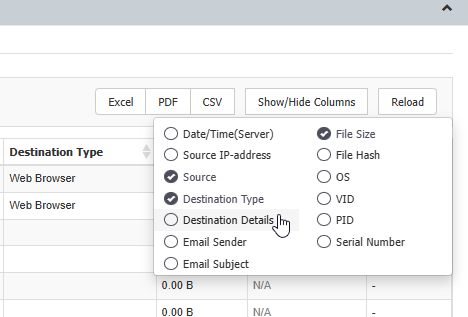
- Click the Show/Hide Columns button.
- Select the Destination column to display the Destination URL in the report.