How to Check the Client-to-Server Connection Status
Overview
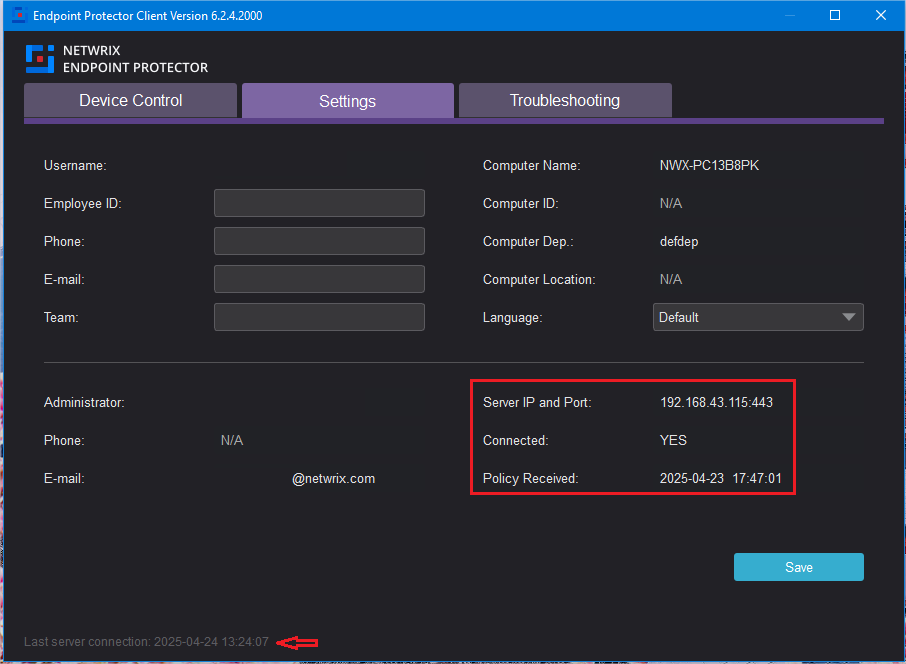
This article explains how to check the connection status between the Netwrix Endpoint Protector Client and the server. You can verify if the client is communicating with the Netwrix Endpoint Protector server and view details such as the last connection time, server IP and port, and the last time policies were received.
Instructions
-
Open the Netwrix Endpoint Protector Client on the endpoint computer.
-
Go to the Settings tab.
-
Press the following key combination, depending on your operating system:
- Windows:
Control + Alt + I - macOS:
Option + Command + I - Linux:
Control + Alt + I
- Windows:
-
If the client is communicating with the server, the following information will be displayed in the bottom right corner:
- The time and date of the last server connection
- The server IP and port
- The connection status
- The time and date when the policies were last received