How to migrate Netwrix Password Manager to another server?
To migrate Netwrix Password Manager perfrom the following steps:
- Install Netwrix Password Manager on a new server.
- Then, stop the product service on the new server.
- Stop the Netwrix Password Manager service on the old server
- Copy the following files from the Password Manager installation directory on the old server to the same location on the new server:
secrets.binalinfo.binPredefinedQuestions.txt(if you changed predefined questions)Templatessubfolder (if you cahnged notifications text)
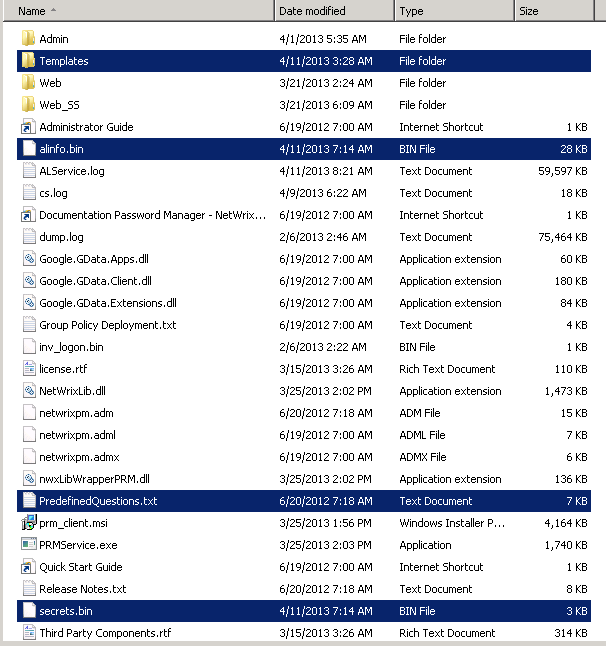
- Start the Netwrix Password Manager service on the new server.
- Wait for several minutes to allow the service read the users enrollment data.
- Go to Administrative portal and apply license
- Make sure firewall is configured corretly o the new server to accept connections
NOTE. If you use the Password Manager clients, change the Password Manager server address in their settings.To do this, perform the following steps
- Navigate to Start - -> Group Policy Management Console snap-in.
- Right-click the GPO created for Netwrix Password Manager and select Edit from the popup menu.
- In the dialog that opens, navigate to Computer Configuration - -> Administrative Templates - -> <Your_Password_Manager_Template>.
- In the right pane, specify the new server URL in the Password Manager Server URL entry field.