Automatic user enrollment failed: The certificate authority is invalid or incorrect (Error code: 12045)
Problem
On startup, the enrollment wizard does not start and returns the following error:
"Automatic user enrollment failed: The certificate authority is invalid or incorrect (Error code: 12045)"
Cause
This issue occurs when you use a self-signed SSL certificate for the Self-Service portal.
Resolution
To resolve the issue, either obtain a signed third-party SSL certificate, or deploy the self-signed certificate to the root CA (certificate authority) store of all problematic workstations.
To deploy a self-signed certificate
-
Save the certificate to a file locally. To do this:
- Browse to the website you have assigned a certificate to.
- Click Agree to continue on the notification screen.
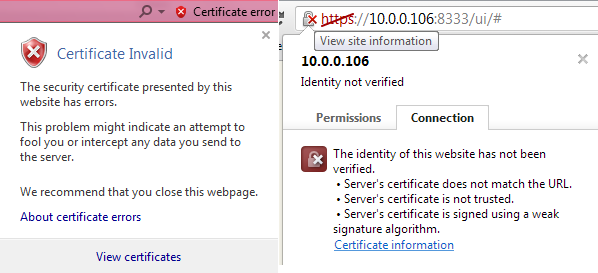
- In the address bar, find the certificate and open the certificate information (see screenshots – View certificates or Certificate information).
-
Go to the Details tab and click Copy to file… (a wizard opens).
-
Select Cryptographic Message Syntax Standard (PKCS #7) and click Next.
-
Select a path to save the file and click Next, then click Finish.
-
Copy the file to the machine where Group Policy Manager is installed.
-
Start Group Policy Manager and edit Default Domain Policy.
-
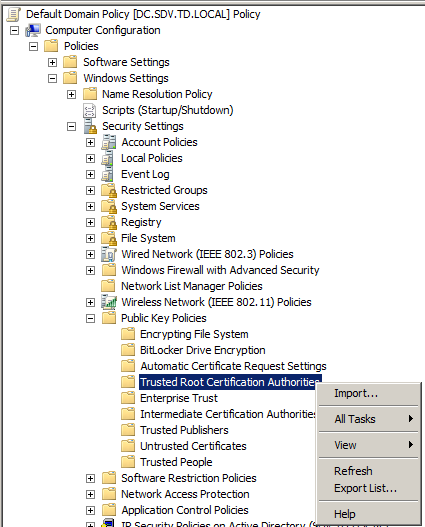
In the Group Policy Object Editor, navigate to: Computer Configuration - Windows Settings – Security Settings - Public Key Policies - Trusted Root Certification Authorities, right-click and select Import.
-
In the wizard, specify the file you created earlier and click Next.
-
Leave Certificate Store as default and click Next, then click Finish.
-
Run
gpupdate /forceor wait until the policy applies automatically.
Additional notes
- Also make sure that the name of the server stored in the certificate matches the name you specified on the Password Manager client setup.
More screenshots here: Deploying a Self-Signed Root Certificate with Group Policy