Does the Password Manager always use your current Windows user to authenticate?
Netwrix Password Manager uses Integrated Windows authentication. By default for Local Intranet zone there is a setting to logon automatically using current credentials.
There are two options to force prompting for credentials:
-
Move Helpdesk portal to the Internet zone.
To do it, go to Control panel - Internet options - Security tab. Select Local Internet zone, click Sites and remove the Helpdesk portal URL. Click Ok and then disable Automatic detection of local intrnate sites.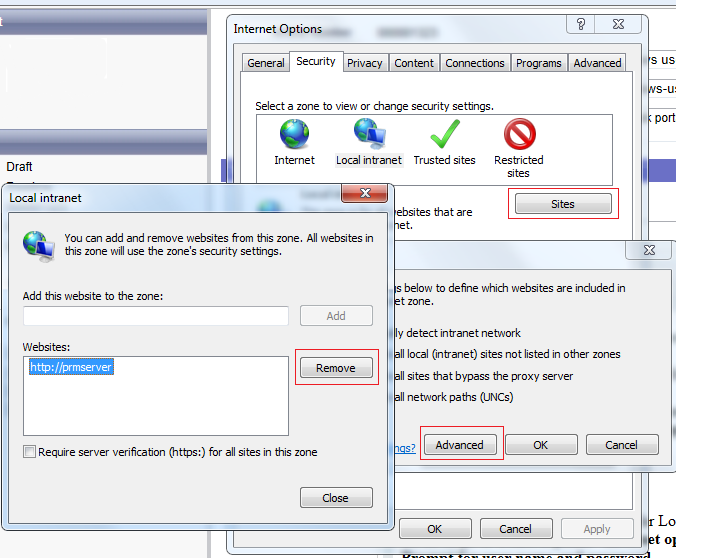
-
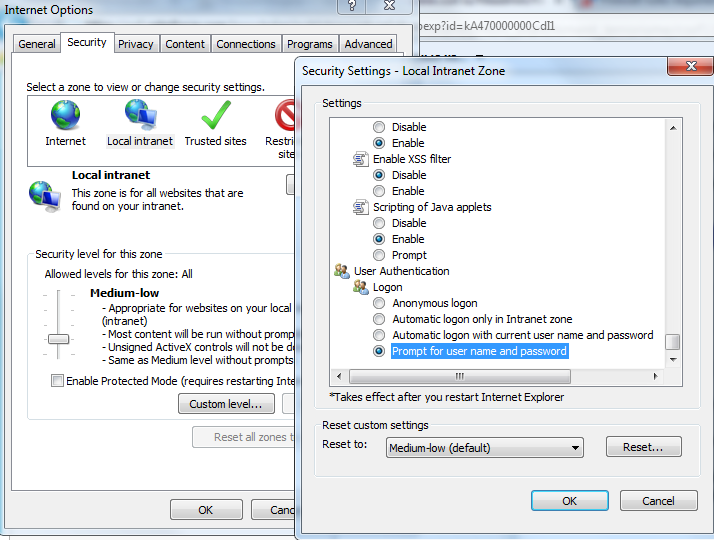
Disable automatic authentication for Local intrantet zone
To do it, go to Control panel - Internet options - Security tab. Select Local Intranet zone, click Custom level, in subwindows scroll to the very bottom and under User Authentication - Logon select Prompt for user name and password.