Error 401 in the Enrollment wizard
You see the Error 401 (Not authorized) message when starting the Enrollment wizard.
Resolution
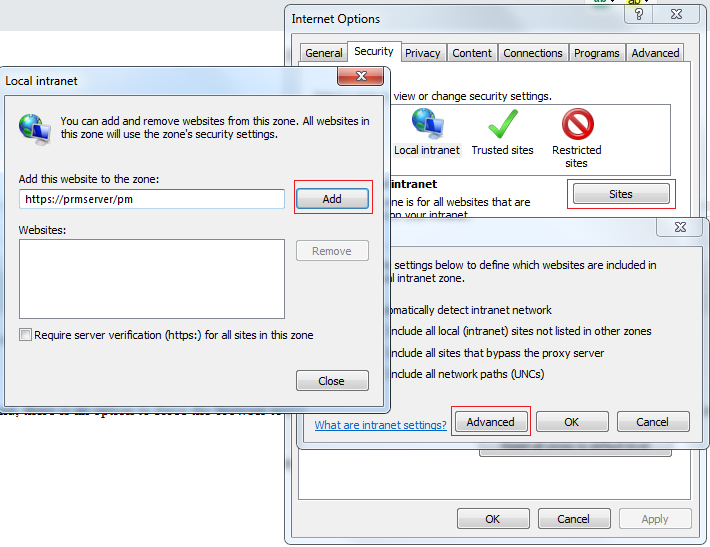
To resolve the issue, add the Password Manager Self-service portal URL to the Local Intranet Zone.
- Launch Internet Options from Control Panel
- Go to the Security tab
- Select Local intranet, click Sites
- Click Advanced
- Type the URL and click Add
- Click Close, then Ok, and again Ok
Workaround: Force the browser to send credentials to the Internet zone
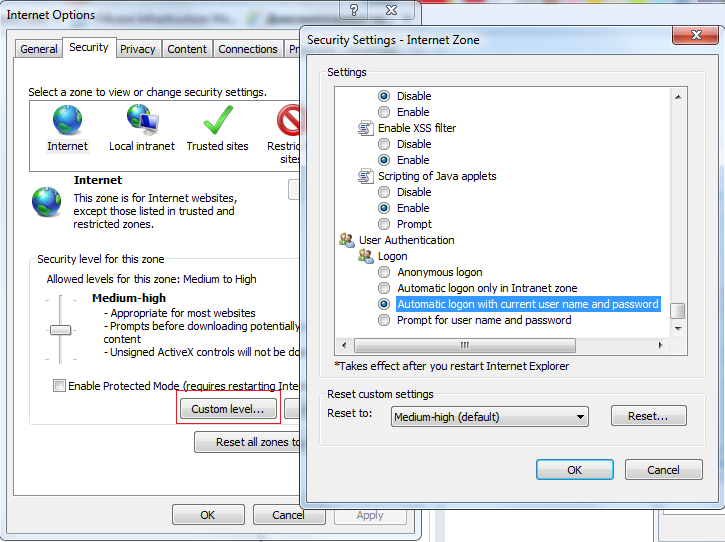
As a workaround, you can force the browser to send credentials to the Internet zone.
- Launch Internet Options from Control Panel
- Go to the Security tab
- Select Internet, click Custom level
- In the Security Settings window that opens, scroll to the bottom
- Select Automatic logon with current username and password radio-button under User authentication - Logon
- Click Ok then Ok again
These settings can also be applied via Group Policy.