How to remove Enrollment Wizard from startup
How can I remove Enrollment Wizard from startup after deployment of the client?
Please see KB2014 if you are looking for a way to disable the client from adding itself to startup. During deployment the client adds a Reg_SZ value called Netwrix Password Manager to the startup registry key.
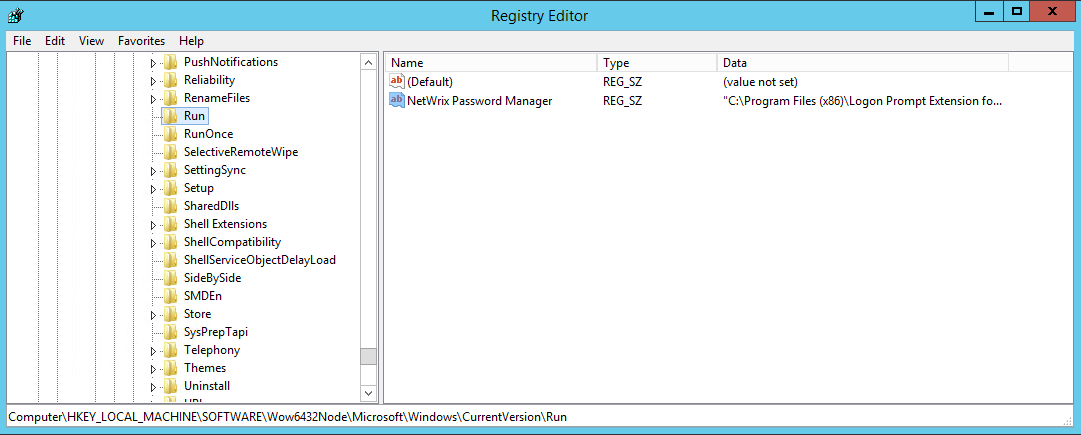
Registry keys
- In 32-bit OS the key is
HKEY_LOCAL_MACHINE\SOFTWARE\Microsoft\Windows\CurrentVersion\Run - In 64bit OS the key is
HKEY_LOCAL_MACHINE\SOFTWARE\Wow6432Node\Microsoft\Windows\CurrentVersion\Run
Remove or disable the Enrollment Wizard
To prevent the Enrollment wizard from running on startup you need to remove the value, or alternatively change its value to point to a non-existing executable. The value can be removed or changed on several machines by means of Group Policy.
- Open the registry key shown above on the target machine.
- Locate the
Reg_SZvalue namedNetwrix Password Manager. - Either:
- Delete the
Netwrix Password Managervalue to remove the startup entry, or - Edit the value and change its data to point to a non-existing executable path to disable startup behavior without deleting the entry.
- Delete the
- To apply this change across multiple machines, use Group Policy to delete or modify the registry value remotely.