How to create second Help-Desk portal
Is there a way to create separate Help-desk portal? Can we have certain users have certain permissions on the second Help-desk portal?
To create another portal and assign permissions, do the following:
- Navigate to the Netwrix Password Manager installation directory, the default path:
C:Program Files (x86)Netwrix Password Manager. - In the installation directory, create a copy of the Web folder and name it as Helpdesk2.
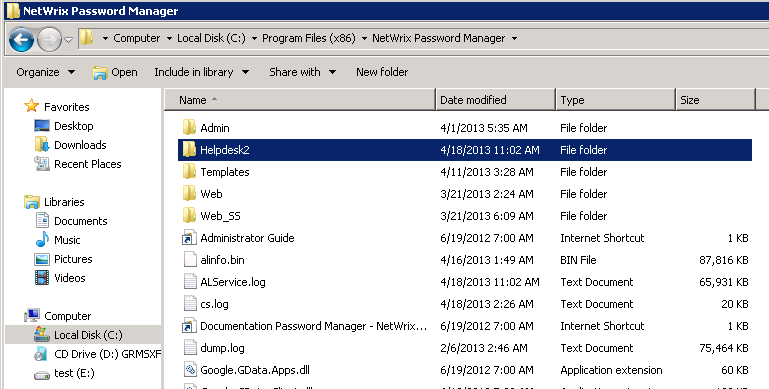
- Select the Web folder, right-click it and select Properties.
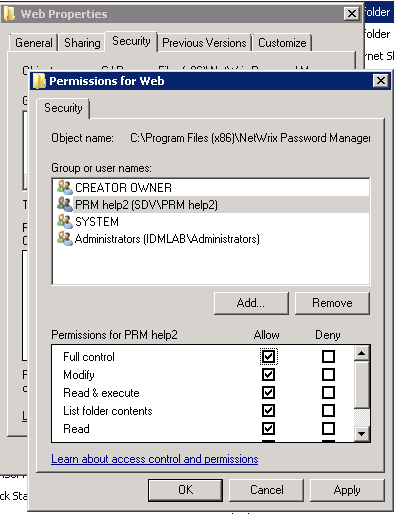
- In the Properties dialog, navigate to the Security tab and change Windows security permissions:
- disable all inherited permissions
- leave full control for SYSTEM, CREATOR OWNER, Administrators
- create a group of users who should have access to the fully functional Help-desk portal, and grant this group full control.
- Start the Internet Informational Services (IIS) Manager.
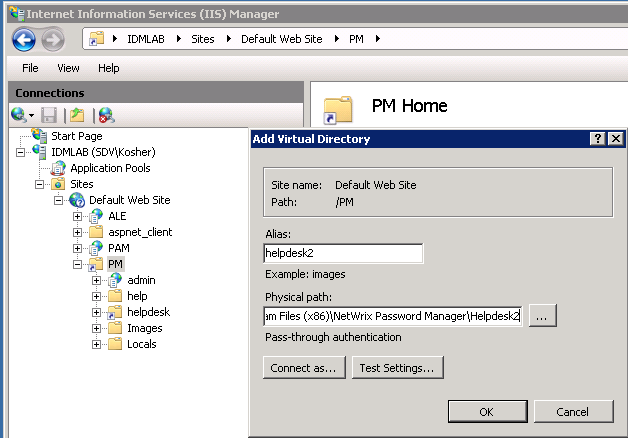
- In the left pane, navigate to %ComputerName% - Sites - Default Web Site - PM, right-click the PM node and select Add Virtual Directory.
- In the Add Virtual Directory dialog, specify Alias (for example, helpdesk2), and Physical path to the new directory created earlier:
C:Program Files (x86)Netwrix Password ManagerHelpdesk2.
- Make sure that only Windows authentication is enabled for this new virtual directory.
- Open the Administrative portal, go to Roles and add the security group created in step 4 to the Help Desk Operators role.
Now you have two Help-desk portals:
- http://prmserver/pm/helpdesk2 - can be accessed by all users, granted the Help Desk Operators role.
- http://prmserver/pm/helpdesk - can be accessed only by Administrators and the special security group you have created.
If you want to add or remove some functionality from the second Help-desk portal, please contact Netwrix Technical Support.