How to customize text in the Password Manager Self-Service portal
Overview
All text on the Password Manager Self-Service Portal is determined by string values and can be changed. If you want to customize any string of text in the Self-Service portal, edit the appropriate language .asp file and restart IIS.
Procedure
- Navigate to the Password Manager installation folder.
- Locate the sub-folder called Web_SSLocals.
- Locate the
.aspfile that corresponds with the language used on the Self-Service portal. By default -en.asp. Open it with Notepad. - Edit any string value in the file and save it.
- Execute the
iisresetcommand.
Names of values are intuitive. If you want to remove a string of text completely, leave the value blank.
For example, if you want to remove the copyright text, set strCopyright=.
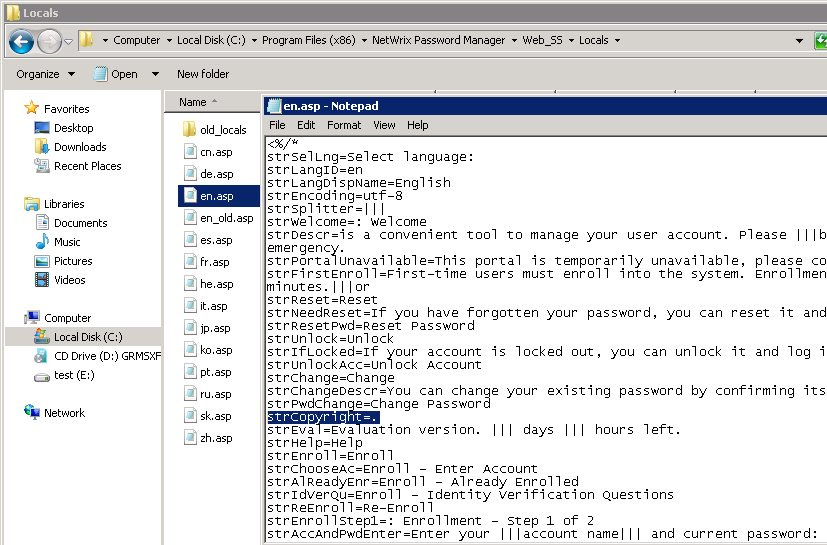
Language files
| File | Language |
|---|---|
cn.asp | Chinese |
de.asp | German |
en.asp | English |
es.asp | Spanish |
fr.asp | French |
he.asp | Hebrew |
it.asp | Italian |
jp.asp | Japanese |
ko.asp | Korean |
pt.asp | Portuguese |
ru.asp | Russian |
sk.asp | Slovak |
zh.asp | Traditional Chinese |