Error C:38 - Unable to Connect to SharePoint Online
Symptoms
When running the SharePoint Job Group and attempting a connection to SharePoint Online, the following issues appear:
- There is a failure in the connection attempt.
- The system generates the following error message:
Error C:38 - Unable to Connect to SharePoint Online
Cause
The PowerShell (PS) script used in the SP_RegisterAzureAppAuth Job was not configured to use the password associated with the temporary connection profile.
Resolution
To resolve this error, follow these steps:
-
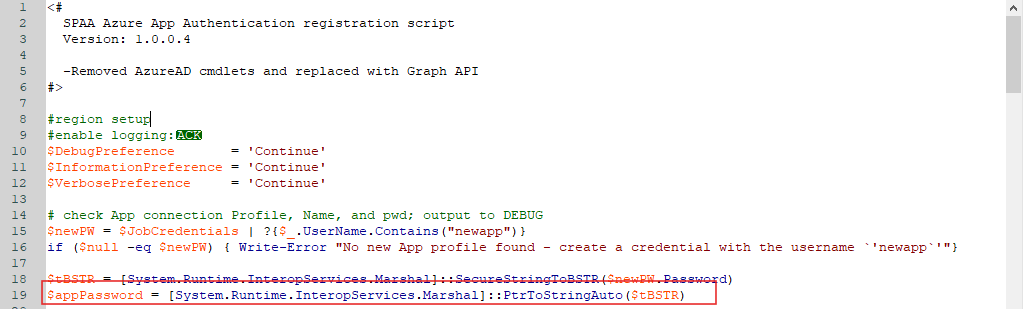
Replace the app password value within the PS script with the password associated with the Azure AD connection profile.
-
After updating these lines within the PS script and the connection profile, run the
SP_RegisterAzureAppAuthJob. This job generates a new connection profile and automatically opens a browser to confirm permissions.NOTE: For more information about the
SP_RegisterAzureAppAuthJob, refer to the following article: SP_RegisterAzureAppAuth Job. -
Once the new profile is created, add the newly generated .pfx file into the generated file path along with the password for the connection profile into the SharePoint connection profile.
-
Apply the newly generated connection profile to the SPAA system scans job. This should successfully connect you to the SharePoint site.
Related Article
- SP_RegisterAzureAppAuth Job