Permission Denied Error
You may see this error when trying to browse to the Helpdesk or Administrative portal:

Such an error occurs when the account whose credentials are used to access the portal is not granted the appropriate security role.
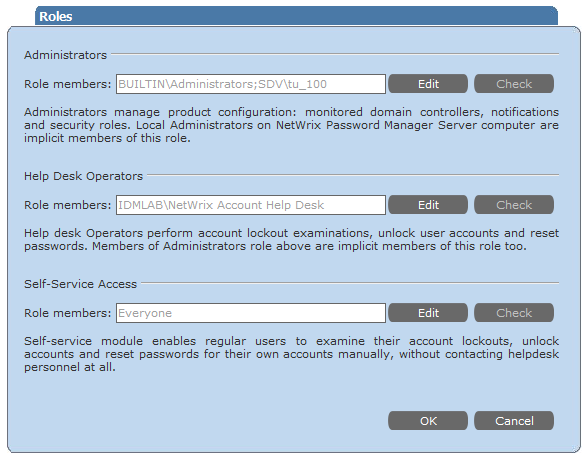
Netwrix Password Manager uses a role-based security model. To access the Help Desk portal, the user must be granted the Help Desk operators role. To access the Administrative portal, the Administrator role is required.
Invalid authentication settings might also cause this error.
To resolve the issue
-
Adjust product security roles.
- Go to the Administrative portal - Roles and make sure that the account or corresponding security group is granted the corresponding role.
-
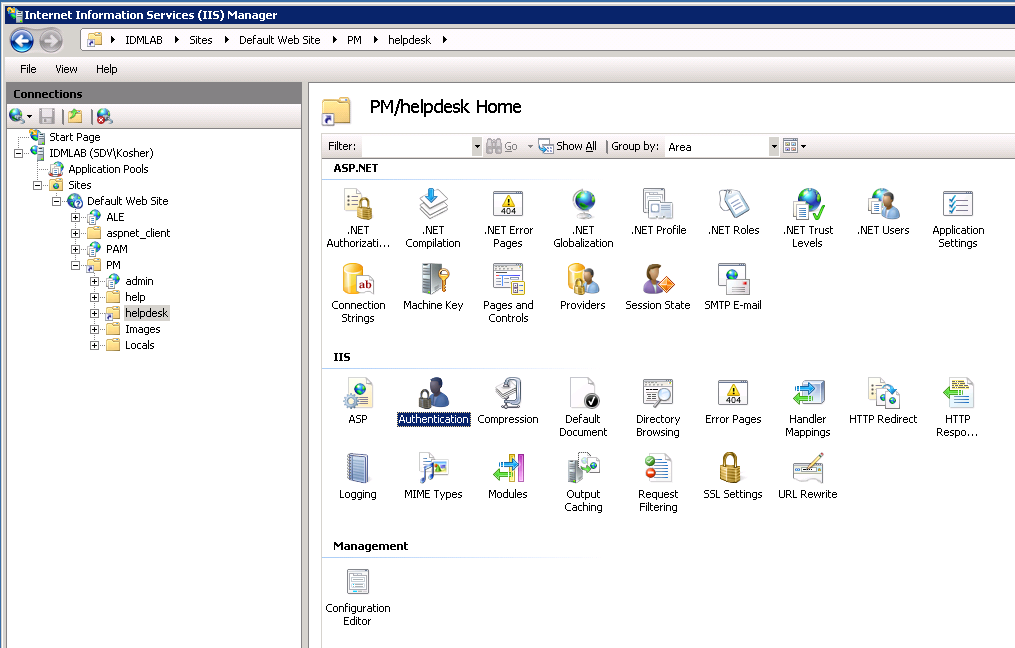
Make sure that Anonymous authentication is NOT ENABLED for the helpdesk and admin virtual directories in the IIS Manager.
To ensure the required settings are enabled in IIS6
- In IIS Manager left pane, navigate to
\<your computer name>- Web Sites - Default Web Site - PM. - Right-click the helpdesk (or admin) virtual directory under the PM folder and select Properties.
- In the Properties dialog, open the Directory Security tab, and select Edit for Authentication and access control.
- In the Authentication Methods dialog, enable either the Integrated Windows authentication box or Basic authentication (password is sent in clear text), and clear all other authentication options for Authentication access.

To ensure the required settings are enabled in IIS7
- In IIS Manager left pane, navigate to
\<your computer name>- Web Sites - Default Web Site - PM - helpdesk (or admin). - In the Manager central pane, double-click the Authentication option under the IIS block.
- In the Authentication list, enable either Windows Authentication or Basic Authentication, and disable all other authentication options.