Active Directory (AD) Users, Groups, or Computers Not Available to Add to SbPAM
Summary
Recently created Active Directory (AD) users, groups, or computers may not be immediately available to be added to the Netwrix Privilege Secure console, due to the last time Active Directory was synced with Netwrix Privilege Secure.
Instructions
- Log in to Netwrix Privilege Secure as an admin user, and navigate to Resources.
- Confirm the domain the desired users and/or groups are members of has already been added (synced) to Netwrix Privilege Secure.
- If the domain doesn't appear in the Resources table, add it using the + New Domain button above the Resources table.
- After confirming the domain is a resource in Netwrix Privilege Secure, click the domain's name in the Resources table.
- Confirm the Last Synchronized date and time.
- If it is not recent, click Synchronize Now to immediately run a domain sync.
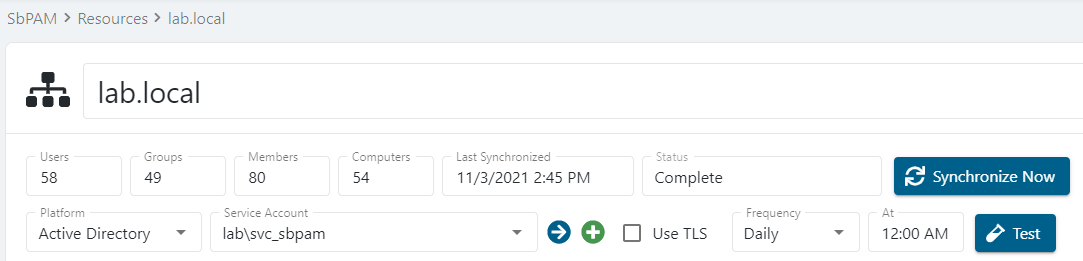
Upon successful domain sync, the Last Synchronized field for the domain will update. All users, groups, and computers in the domain will now be available to be onboarded to Netwrix Privilege Secure.