Resolving failed Actions on a Windows resource due to error "The WS-Management service cannot process the request. The service is configured to not accept any remote shell requests."
Summary
If remote shell access is disabled on a Windows resource, Netwrix Privilege Secure's Action Service cannot perform actions on that host. You can confirm this when an action's logs contain the following error:
Unable to connect using PowerShell remoting to <hostname> with user <domain>\<user>: Connecting to remote server <ip_address> failed with the following error message : The WS-Management service cannot process the request. The service is configured to not accept any remote shell requests.

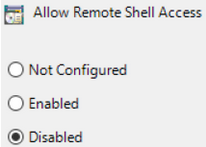
This is caused by a Group Policy, configured at the local or domain level, that disables remote shell access on the resources the GPO targets:
Instructions
You can verify this GPO in the Group Policy Editor on the target resource (or in the domain GPO configuration). Remember that domain configuration takes precedence over local configuration.
Computer Configuration > Administrative Templates > Windows Components > Windows Remote Shell > Allow Remote Shell Access
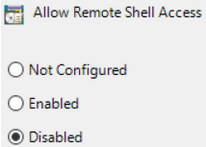
You can also verify the setting in PowerShell, but the GPO must first have been Enabled or Disabled so the correct registry key exists:
Get-ItemProperty -Path "HKLM:\Software\Policies\Microsoft\Windows\WinRM\Service\WinRS" -Name "AllowRemoteShellAccess"
- If the value is set to 0, then remote shell access is Disabled.
- If the value is set to 1, then remote shell access is Enabled.

To resolve the error, set this GPO to either Enabled or Not Configured. In a domain environment, you should make this change via a domain-configured GPO rather than manually modifying the registry key on the target resource.