How to Customize Event Service Listening Port(s)
Symptoms
You need to customize Threat Manager listening ports for the Event Service due to customer or environmental requirements.
Cause
Customer or environmental requirements dictate that the default Netwrix Threat Prevention Event Service listening port(s) must be changed.
Resolution
Alter the default Netwrix Threat Prevention Event Service listening port(s) via PGAdmin:
- Install the latest PGAdmin Console: https://www.pgadmin.org/download/
- Connect to the Netwrix Threat Prevention database. Create a “Master” password for PGAdmin and enter the Netwrix Threat Prevention database password:
DEFEND124!! - Select Tables > defend_config table
- Right click and select View/Edit Data > First 100 Rows
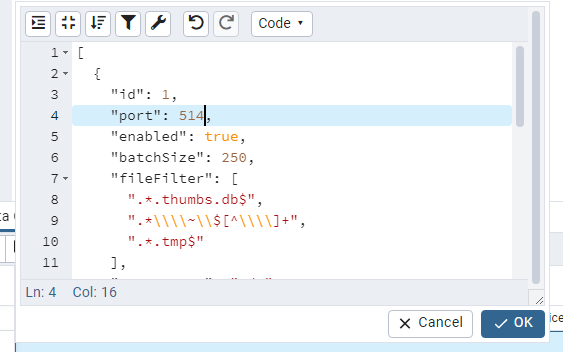
- Change the Value for the port in question on line 2 (
10000is the Default FS Port and10001is the Default AD Port):
[{"id":1,"port":10000,"enabled":true, ...}{"id":2,"port":10001,"enabled":true, ...}{...}]
For example, change the FS port to 514 and click OK:
- In the window below click the Save Data Changes icon.
- Restart the Netwrix Threat Prevention Event Service.