Email Message Options
Email message options are set for each password policy from the Maximum Age Rule rule properties page. Complete the following steps to configure the email message options for a policy.
Step 1 – Click the Polices item to display the Polices view.
Step 2 – Double-click the policy you want in the right pane of the management console.
Step 3 – Double-click the Age (Max) rule.
Step 4 – Select the Enabled checkbox to enable the Maximum Age rule.
Step 5 – Choose a value from the Days and Mode dropdown lists.
Step 6 – Click the Email tab.
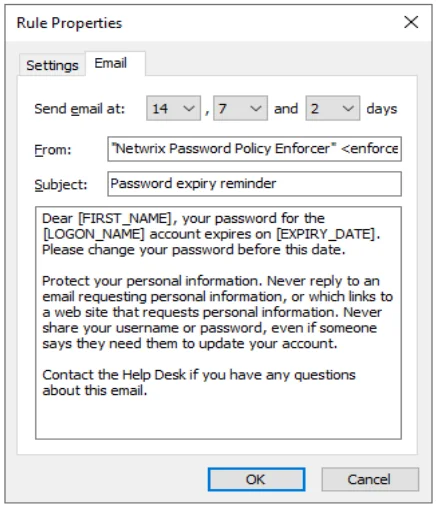
Choose values from the days dropdown lists to specify when to send emails. By default, emails are sent 14, 7, and 2 days before a user's password expires.
Choose the first item in a list (blank) to send fewer than three emails.
Enter the name and email address you want to appear in the email's From field in the From text
box. The correct format is "Display Name" <mailbox@domain.com>
Enter the text for the email's Subject field in the Subject text box.
Enter the body of the email in the large text box. The email is sent as plain text unless the body
includes the <html> tag. If sending email as HTML, you must include the complete HTML document
starting with <html> and ending with </html>. If the body is too long to fit in the text box,
enter a path to a file like this:
file:C:\path\filename.ext
The path can contain environment variables like %SystemRoot%. Don't use quotes for long filenames and don't include any other text. The Password Policy Enforcer Mailer reads the email body from the specified file.
The email's subject and body can contain various macros. Use these macros to personalize the email.
| Macro | Replaced with |
|---|---|
| [LOGON_NAME] | User's logon name |
| [FIRST_NAME] | User's first name |
| [LAST_NAME] | User's last name |
| [DAYS_TO_EXPIRY] | Days until password expires |
| [EXPIRY_DATE] | Expiry date in short format |
| [EXPIRY_DATE_LONG] | Expiry date in long format |
| [EXPIRY_DAY] | Expiry day (1 to 31) |
| [EXPIRY_DAY_NAME] | Expiry day (Monday, Tuesday, ...) |
| [EXPIRY_MONTH] | Expiry month (1 to 12) |
| [EXPIRY_MONTH_NAME] | Expiry month (January, February, ...) |
| [EXPIRY_YEAR] | Expiry year (2021, 2022, ...) |