Passphrases
Passphrases have gained popularity in recent years as they can be more difficult to crack and easier to remember than passwords. The difference between passwords and passphrases is their length. Passwords are rarely longer than 15 characters, but passphrases commonly contain 20 or more characters.
Complexity and dictionary rules are less important for passphrases as passphrases rely primarily on length for security. You may therefore want to relax some password policy requirements for passphrases.
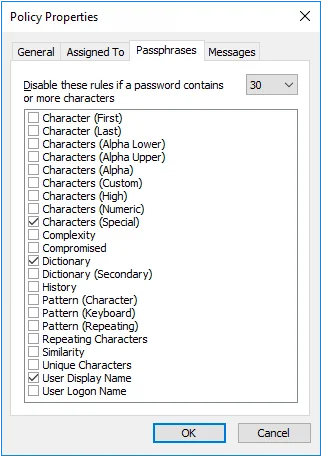
Step 1 – Click the Policies item to display the Policies View.
Step 2 – Click the policy you want in the right pane of the management console.
Step 3 – Click Properties in the right pane of the management console.
Step 4 – Click the Passphrases tab.
Step 5 – Choose the minimum number of characters a password must contain before some rules are disabled from the dropdown list.
Step 6 – Select the rules to disable.
Step 7 – Click OK to close the Policy Properties page
Disabled rules aren't counted when calculating the compliance level, but Password Policy Enforcer accepts passphrases that comply with all enabled rules, irrespective of the compliance level. This ensures that passphrases can be used, even if they don't meet the compliance level when Password Policy Enforcer is configured to disable one or more rules for passphrases.
Opinions differ on how long a passphrase needs to be. Even a 30 character passphrase can be weaker than a well-chosen password. Don't disable too many rules under the assumption that length alone makes up for the reduced complexity, as this isn't always true.