License Generator
Use the License Generator tool to create licenses for Netwrix Password Policy Enforcer, Netwrix Password Policy Enforcer Web, and Netwrix Password Reset products. Licenses can be configured and customized based on individual security polices. Each generated license is saved locally as a .txt file. Use the license generated from this tool when configuring the Password Policy Enforcer console.
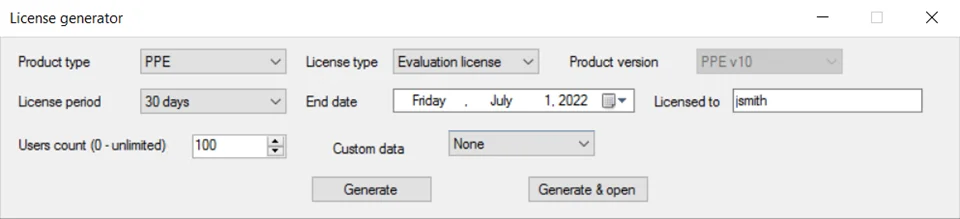
Using the License Generator
The License Generator tool installs with the default installation of Password Policy Enforcer under
the C:\Program Files (x86)\Password Policy Enforcer\licensegenerator folder. Once installed,
execute the AnixisLicenseTool.exe file. The LicenseGenerator folder also contains templates for
common licensing scenarios across all password policy enforcement products.
The License Generator tool has the following features:
-
Product Type — This dropdown contains all password policy enforcement products under the Netwrix suite of products
-
License Type — This dropdown contains all license categories and determines the scope and permissions granted to the license. The different License types are as follows:
- Evaluation license — This license type allows users on the server to have full evaluation permissions
- Perpetual license — This license type allows users on the server to have full permissions indefinitely
- Subscription license — This license type allows users on the server to have all permissions as granted by their subscription model
-
Product Version — Lists all product versions the License Generator can create valid license for. This field is enabled only when selecting the Perpetual license type.
-
License Period — This dropdown contains all available options for licensing. This field is enabled only when selecting the Evaluation and Subscription license types.
-
End Date — Date on which the custom license will expire. This field is enabled only when selecting the Evaluation and Subscription license types.
-
Licensed To — The name of the entity to receive the license
-
Users count — The number of users granted permissions set in the license
-
Custom Data — This dropdown contains the option to classify this license as a enzoic-enabled license
-
Generate — Press this button to generate the license and save the .txt file.
-
Generate & open — Press this button to generate the license and open the .txt file. Copy the entire license and import it into Password Policy Enforcer. See the Management Console topic for additional information.