Character Rules
Password Policy Enforcer has seven Character rules that reject passwords if they contain, or don't contain certain characters. These rules can increase password strength or ensure password compatibility with other systems.
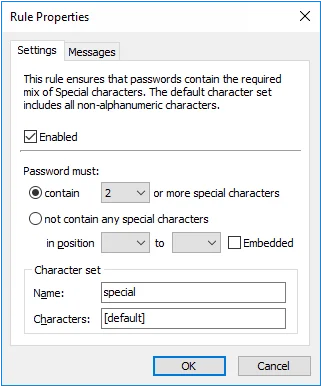
All the Character rules work identically, but each has their own default character set. A character set is the collection of characters that each rule searches for when checking a password. You can use the Character rules with their default character sets, or define your own. By default, the Password Policy Enforcer will select the Password Policy Enforcer character on the Policy Priorities page.
Only Password Policy Enforcer 10.2 and later contain the Windows character set. Password Policy Enforcer 9, Netwrix Password Reset 3, and Password Policy Enforcer/Web 7 (and older for all products) always use the Password Policy Enforcer character set.
This default character set contains the following:
| Rule | Default character set |
|---|---|
| Alpha Lower | Lowercase alphabetic (a-z) |
| Alpha Upper | Uppercase alphabetic (A-Z) |
| Alpha | Uppercase and lowercase alphabetic (a-z & A-Z) |
| Numeric | Numerals (0-9) |
| Special | All characters not included above |
| High | All characters above ANSI 126 |
| Custom | No default characters |
Select the Enabled checkbox to enable the Character rule.
Select the contain option if this rule should ensure that new passwords contain certain characters. Only one character is required by default, but you can specify a different value by choosing the required number of characters from the dropdown list beside the contain option.
Select the not contain any... option if this rule should ensure that new passwords don't contain certain characters.
To restrict this rule to certain character positions, choose the starting position from the in position dropdown list, and the ending position from the to dropdown list. For example, you may want to enforce a rule that requires a numeric character in the second character position to maintain compatibility with some other system.
Select the Embedded checkbox if users are required to embed these characters within their passwords. For example, the passwords "12hello", "1hello", and "hello$987" don't contain any embedded numeric characters, but these passwords do contain embedded numeric characters (shown in bold type): "he7llo", "4he3llo", "23hello7$45". Embedded numeric and special characters can help to protect passwords from cracking attacks.
Enter a character set name in the Name text box. The Password Policy Client displays the new name, but the Password Policy Enforcer management console continues to display the original character set name.
Enter some characters in the Characters text box to define a custom character set to replace the default. For example, enter "AaEeIiOoUu" to create a vowel character set.
Click the Messages tab to customize the Password Policy Client rule inserts.
The First Character, Last Character, and Complexity rules are easier to configure, and easier for users to understand. Use these rules instead of the Character rules if they can enforce your desired policy.
Enforcing Complex Character Requirements
Character rules can be combined to enforce complex password requirements. For example, you may need to enforce a policy such as "passwords must contain a numeric character, but not in the first two positions" to ensure compatibility with some other system. Use two of the Character rules to accomplish this. The first rule (shown on the left in the following table) ensures that passwords contain at least one numeric character. The second rule ensures that passwords don't contain any numeric characters in the first two positions.
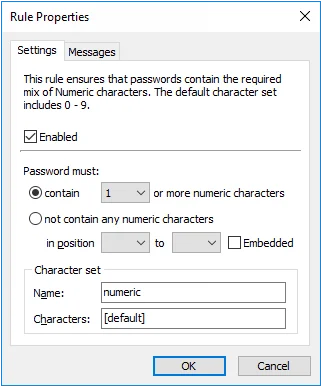 | 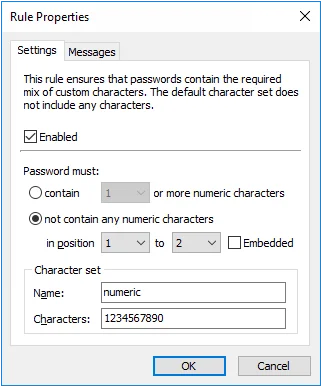 |
Password Policy Enforcer has only one Numeric rule, so the second requirement must be enforced by one of the other rules. Use any unused Character rule for this purpose by changing its name and default character set. In this Example, the Custom rule was chosen as it wasn't being used. The character set name was changed to "numeric", and the character set was defined as "1234567890".