Complexity Rule
The Complexity rule rejects passwords that don't contain characters from a variety of character sets. Using several character types can make passwords more difficult to crack.
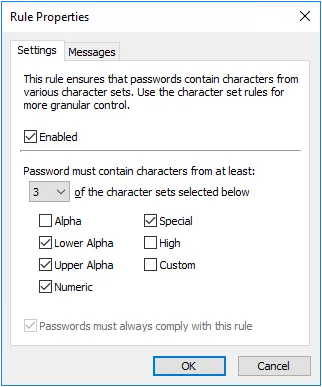
Select the Enabled checkbox to enable the Complexity rule.
Choose the number of required character sets from the dropdown list. Password Policy Enforcer rejects passwords that don't contain characters from at least the specified number of character sets.
Choose the available character sets by selecting the check boxes beside the character set names. The number of available character sets must be equal to or greater than the number of required character sets.
Select the Passwords must always comply with this rule checkbox to make the Complexity rule mandatory. Password Policy Enforcer rules are mandatory by default, but can be made optional by changing the Reject passwords that don't comply with value in the Policy Properties page. A mandatory rule can still be disabled when a passphrase is used. See the Passphrases topic for additional information.
Click the Messages tab to customize the Password Policy Client rule inserts.
The Complexity rule uses custom character set definitions from the Character rules, even if the Character rules are disabled.