Similarity Rule
The Similarity rule rejects passwords that are similar to a user's current password. Password similarity may indicate that a user is serializing their passwords. For example, "password1", "password2", "password3", etc. Password serialization should be avoided because it may allow an attacker to guess the new password.
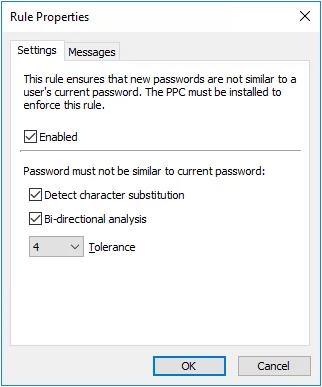
Select the Enabled checkbox to enable the Similarity rule.
- Select the Detect character substitution checkbox if Password Policy Enforcer should reject passwords that rely on character substitution to comply with this rule.
- Select the Bi-directional analysis checkbox if Password Policy Enforcer should additionally test passwords with their characters reversed. Enabling bi-directional analysis stops users from circumventing this rule by reversing the order of characters in their password. For example, a user may enter "drowssapdloym" instead of "myoldpassword".
- Choose a value from the Tolerance dropdown list to specify the maximum number of consecutive matching characters that Password Policy Enforcer tolerates before rejecting a password. For example, the two passwords "oldpasswd" and "newpasswd" contain six consecutive matching characters (shown in bold type). Password Policy Enforcer rejects the new password if the tolerance is five or lower, and accepts it if the tolerance is six or higher. Choose the Auto value to reject passwords that contain the user's entire current password.
note
Click the Messages tab to customize the Password Policy Client rule inserts. This rule is only enforced if the Password Policy Client is installed. It doesn't store or transmit passwords or password hashes.