RSA MFA Bypass When Password Policy Enforcer Client Is Installed
Symptom
When Netwrix Password Policy Enforcer Client is installed on endpoints with RSA MFA, users can bypass RSA MFA and log in to the machine using only a username and password.
Cause
By default, the Windows Logon Screen calls Password Policy Enforcer Client, which presents username and password fields on the logon screen. When RSA MFA is configured to require a different authentication method, these username and password fields remain available, allowing users to log in without going through the authentication method configured for RSA MFA.
Resolution
Both options achieve the same result: they disable Password Policy Enforcer Client for the logon usage scenario by writing the same registry values.
- Use Option 1 if your organization uses Group Policy.
- Use Option 2 if your organization does not use Group Policy — deploy the registry change using your organization's standard method for pushing registry values.
After applying either option, the username and password fields will no longer appear on the Windows logon screen. Only the authentication method configured for RSA MFA will be available at logon.
Option 1 — With Group Policy:
NOTE: Install the Password Policy Client administrative template before these steps. For the ADMX template and installation steps, see Configuring the password policy client.
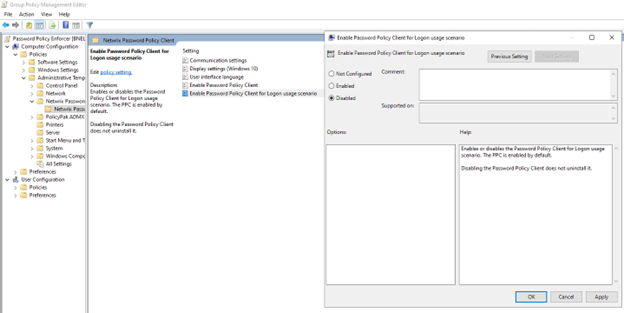
- In Group Policy Management, edit the GPO linked to the affected machines.
- Expand Computer Configuration > Policies > Administrative Templates > Netwrix Password Policy Enforcer > Netwrix Password Policy Client.
- Set Enable Password Policy Client for Logon usage scenario to Disabled and save.
Option 2 — Without Group Policy:
- Open Registry Editor (
regedit) on the affected machine. - Navigate to
Computer\HKEY_LOCAL_MACHINE\SOFTWARE\Policies\ANIXIS\Password Policy Client. - Edit or create a
DWORDvalue namedPPCEnabledForLogonand set it to0.
This may require a reboot to take effect.
