Storing Password History in Netwrix Password Policy Enforcer
Question
How to set up Netwrix Password Policy Enforcer (PPE) to store the password history in an existing attribute?
Answer
IMPORTANT: While this article covers the use of an existing attribute for the password storage, you can use a newly created attribute. There are 2 distinct benefits when using a new attribute:
- The new attribute won't be used by any other application.
- The new attribute can be marked as Confidential in Active Directory.
This article covers the use of the ppePwdHistory attribute created by PPE and marked Confidential by default. Alternatively, you can use an existing atribute not used by other applications, e.g. desktopProfile. Learn more about the
desktopProfileattribute in Desktop-Profile attribute ⸱ Microsoft: https://learn.microsoft.com/en-us/windows/win32/adschema/a-desktopprofile
Prerequisites
- Perform the steps on your schema master domain controller.
- The account used to perform the steps must be a member of the Domain Admin group.
- If you use a custom attribute, it must be a single-valued attribute with one of these syntaxes: octet string, printable string, IA5 string, or Unicode string. It should also allow long strings — possibly as long as
5411characters to store 100 hashes.
Refer to the following steps to discover the schema master domain controller in your environment:
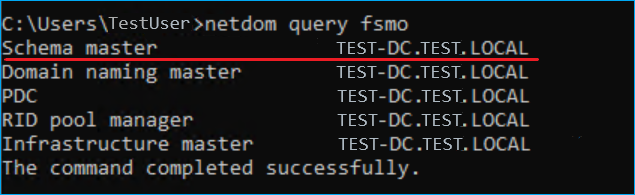
- On any domain controller in your environment, run the following command in an elevated Command Prompt to get a list of Flexible Single Master Operation (FSMO) roles in Active Directory:
netdom query fsmo
- Review the list of FSMO roles to find the schema master domain controller (see the screenshot for reference).
Setup
Refer to the following steps to configure the password history attribute:
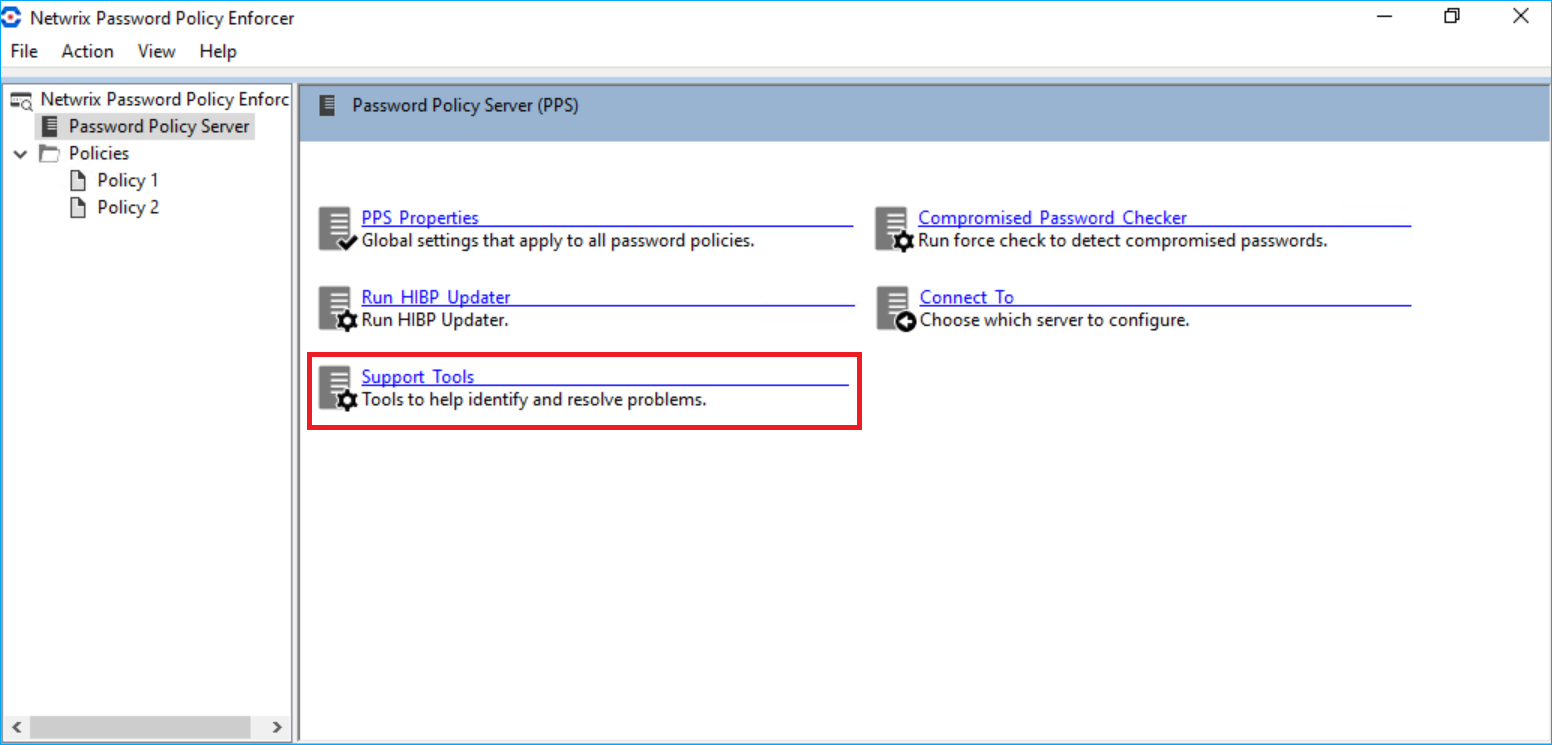
- On your schema master domain controller, open the PPE configuration console.
- In the Password Policy Server tab, select Support Tools.
- Select the Property Editor tab.
- Select the
HISTORYATTRvalue in the Property drop-down list. Specify theppePwdHistoryor other attribute value in the Value field. Specify1020in the Property ID field. Click Set value to save changes.
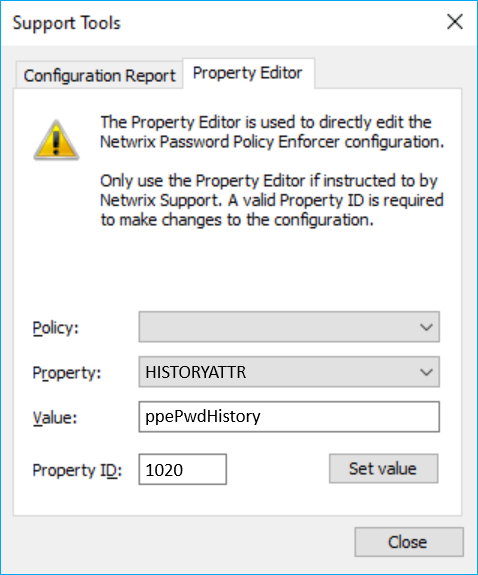
PPE will now store the password history in the attribute you selected. Because authenticated users can read standard attributes of other users, you should change the Active Directory permissions for the existing attribute to prevent users from reading the hashes (password history) of other users. This is required when you use existing attributes. The ppePwdHistory attribute created for PPE is protected by default.
You can also implement the Enforce password history policy to avoid making changes in Active Directory. Learn more in Enforce password history ⸱ Microsoft: https://learn.microsoft.com/en-us/windows/security/threat-protection/security-policy-settings/enforce-password-history
Related articles
- Desktop-Profile attribute ⸱ Microsoft: https://learn.microsoft.com/en-us/windows/win32/adschema/a-desktopprofile
- Enforce password history ⸱ Microsoft: https://learn.microsoft.com/en-us/windows/security/threat-protection/security-policy-settings/enforce-password-history