User Not Logged-On Warning During HIBP Updates
Symptoms
- The weekly HaveIBeenPwned (HIBP) database update fails.
- Netwrix Password Policy Enforcer prompts the following warning in the schedule history:
Launch condition not met, user not logged-on
The warning includes the following description:
Task Scheduler did not launch task "\Netwrix\%task_name%" because user "%user_account%" was not logged on when the launching conditions were met.
User Action: Ensure user is logged on or change the task definition to allow launching when user is logged off.
NOTE: Refer to the following steps to review the schedule history:
- In the Netwrix Password Policy Enforcer window, select Action and click the Run HIBP Updater button.
- Click the Scheduler button.
- Select a schedule from the list and click Edit schedule.
- In the right pane, click the History button.
Cause
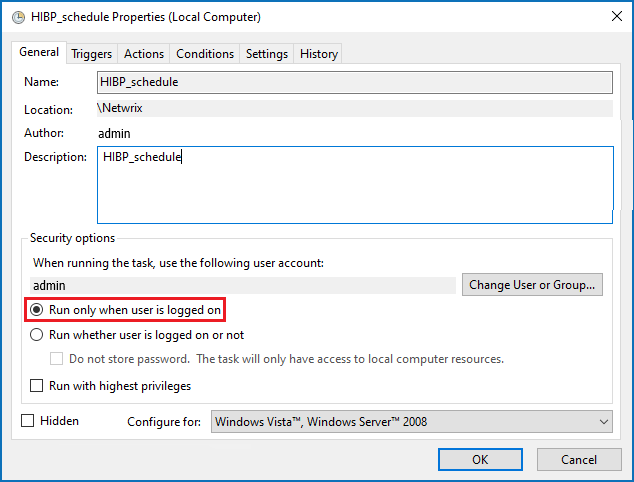
The Run only when user is logged in feature is enabled in the scheduled task to update the HIBP database. The corresponding user is not logged in during the weekly HIBP database update attempt.
Resolution
Switch the radio button to the Run whether user is logged on or not option in the Task Scheduler task.
- On the Netwrix Password Policy Enforcer server, launch Task Scheduler.
- In the left pane, extend the Task Scheduler Library folder and select the Netwrix folder.
- In the central view, select the Netwrix Password Policy Enforcer task, right-click it, and select Properties.
- In the Properties window, switch the security option to the Run whether user is logged on or not option.
NOTE: Alternatively, you can change the designated user to keep the Run only when user is logged in feature on. To change the user, click the Change User or Group... button in the Properties window. Specify the new user.