Passphrases
Passphrases have gained popularity in recent years because they can be more difficult to crack and easier to remember than passwords. The difference between passwords and passphrases is their length. Passwords are typically 12 to 20 characters, but passphrases commonly contain 20 or more characters.
Rules like Complexity and Dictionary are less important for passphrases because passphrases rely primarily on length for security. You can relax some password policy requirements for passphrases by configuring Password Policy Enforcer (PPE) to disable some rules when passwords reach a certain length.
-
Open the PPE Configuration Console.
-
Click the name of a policy in the policy list.
-
Select the Passphrase tab.
-
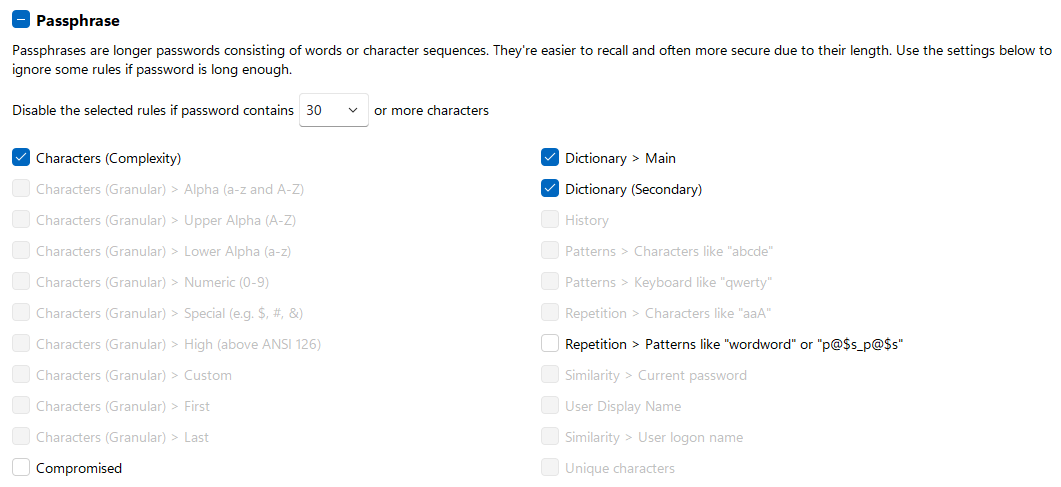
Select the Passphrase checkbox to enable this feature.
-
Select the minimum number of characters from the contains dropdown. PPE disables the specified rules when a password contains at least this many characters.
-
Select the rules you want to disable for passphrases.
PPE excludes disabled rules when calculating the compliance level (the Passwords must comply with setting on the policy's Properties tab). PPE accepts a passphrase that complies with all enabled rules, even if it doesn't meet the compliance level.
Opinions differ on how long a passphrase needs to be. Even a 30-character passphrase can be weaker than a well-chosen password. Don't disable too many rules under the assumption that length alone compensates for reduced complexity.