Policy properties
The Properties tab contains general settings for the displayed policy.
- Open the PPE Configuration Console.
- Click the name of a policy in the policy list.
- Select the Properties tab.
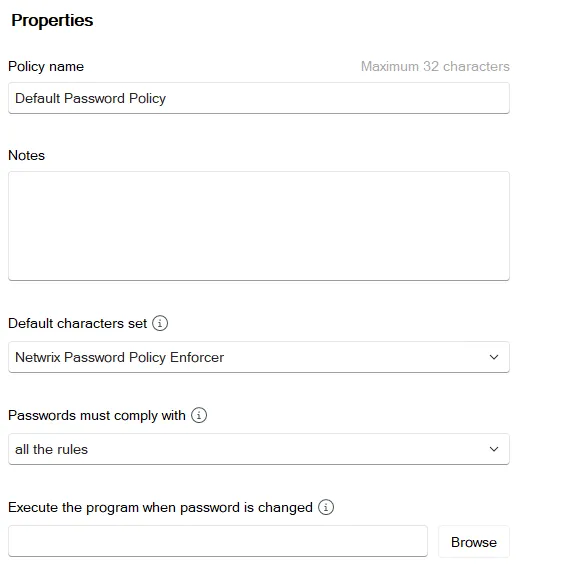
Name. Every policy must have a unique name. You can change the name in this text box if you want to rename the policy.
Notes. This is an optional field that you can use to keep notes about the policy.
Default character set. Password Policy Enforcer (PPE) has seven character sets. Some rules use these character sets to classify characters. For example, the Complexity rule needs to classify the characters in a password to determine if the required number of character types is present. This dropdown controls how PPE populates the default character sets. Select Netwrix Password Policy Enforcer from the dropdown to use PPE's internal defaults, based on the basic Latin letters and digits shown in the following table. This option works best for English-language passwords, or any password that contains only unaccented Latin characters. Select Windows from the dropdown to use Windows' built-in character classification. This option is suitable for all languages, but isn't fully backward compatible with PPE's default character sets.
| Character Set | Password Policy Enforcer default characters |
|---|---|
| Lower Alpha | Lowercase letters (a-z) |
| Upper Alpha | Uppercase letters (A-Z) |
| Alpha | Uppercase and lowercase letters (a-z and A-Z) |
| Numeric | Digits (0-9) |
| Special | All characters not included in the preceding rows |
| High | All characters above ANSI 126 |
| Custom | No default characters |
You can use the Characters (Granular) rules to override the default characters in any character set. This is especially important for the Custom set as it is empty by default.
PPE 10.0 was the first version to include the Windows default character set. Don't select Windows if you are using an older Password Policy Client, PPE Web 7.x or older, or Netwrix Password Reset. Always use the PPE character set with these products as it's the only supported option.
- Some languages such as Japanese don't distinguish between uppercase and lowercase. When you select Windows, these characters are in the Alpha set, but not in the Upper Alpha or Lower Alpha sets.
- When you select Windows, PPE puts characters that Windows classifies as a space, punctuation, control, or blank in the Special set. This is true even if Windows also classifies them as another character type. For example, a superscript one is both a decimal digit and a punctuation character according to Windows. PPE only puts it in the Special character set because of the punctuation classification.
- When you select Netwrix Password Policy Enforcer, PPE puts all characters above ANSI 126 in the High set. When you select Windows, PPE only puts a character in the High set if the character is above ANSI 126 and Windows doesn't classify it as any other character type.
Passwords must comply with. Select the number of rules that users must comply with (compliance level) from this dropdown. The default value, all the rules, requires users to comply with all enabled rules in this policy. Select a different option if you want PPE to enforce a more lenient password policy. For example, you may want to enable five rules, but only require users to comply with four of them. You can keep the Complexity rule mandatory after lowering the compliance level by selecting Passwords must always comply with this rule in the rule's settings.
PPE excludes the Minimum Age rule and Maximum Age rule from the compliance level calculation because these rules don't evaluate the password's content. PPE may also disable some rules when a user enters a passphrase. PPE accepts a passphrase that complies with all enabled rules, even if it doesn't meet the compliance level.
Execute the program when password is changed. Password Policy Enforcer can execute a password synchronization program or script after every successful password change. Enter the full path to the executable and required parameters in this text box. This text box can include environment variables like %ProgramFiles%. Every computer running PPE should have a local copy of the program or script.
PPE sends the user logon name and new password as command-line parameters. For example, if you add the following commands to a batch file, PPE records each user's logon name and new password in c:\passwords.txt:
echo Username: %1 >> c:\passwords.txt
echo Password: %2 >> c:\passwords.txt
This script is an example only. You shouldn't store user passwords.
Secure the program or script and its related components so that no one can tamper with them. Someone could capture user passwords if they can modify or monitor its execution.
You can also include the [USERNAME] and [PASSWORD] macros in the command to explicitly define where PPE inserts these parameters. If you specify neither, then PPE sends the username as the first parameter and the password as the second. If your program or script only needs the username, then include only the [USERNAME] macro so that PPE doesn't unnecessarily send the password.