History rule
The History rule stops users from reusing passwords or cycling through a fixed set of passwords. Password reuse defeats the purpose of enforced password changes. Password Policy Enforcer (PPE) can stop users from reusing passwords for a number of password changes or a number of days.
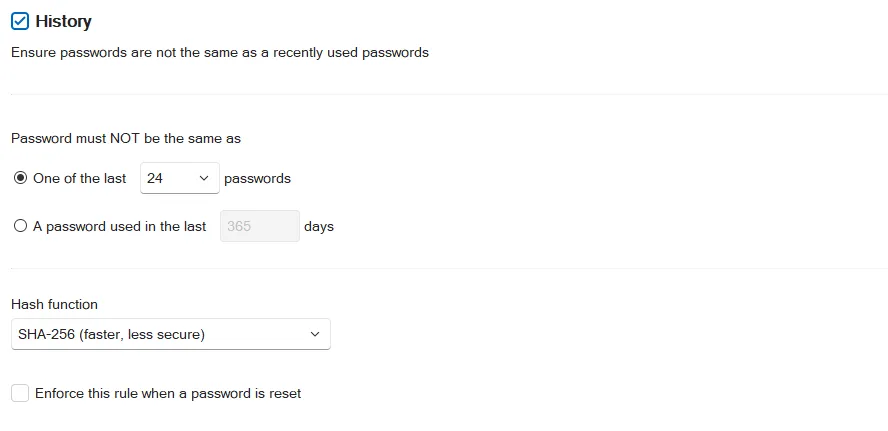
Select the History checkbox to enable the History rule.
Select the One of the last option if you want PPE to stop password reuse for a specified number of password changes. Select the number of password changes from the passwords dropdown.
Select the A password used in the last option if you want PPE to stop password reuse for a specified number of days. Enter the number of days in the days text box.
SHA-256 is the default Hash function because it's fast and has no performance impact. Argon2 hashing uses 100,000 times more processing power to create a hash, so an attacker needs 100,000 times more processing power to crack Argon2 hashes. Argon2 increases password change times by 400%, so a domain controller that can handle 1,000 password changes a minute with SHA-256 selected can handle about 250 password changes a minute with Argon2 selected. All numbers are approximate. Use Argon2 if your domain controllers can handle the load.
Changing the hash function affects new password history records only; existing records retain their original hash. If a user has Argon2 and SHA-256 hashes in their password history, then PPE calculates both hashes during a password change.
Select the Enforce this rule when a password is reset checkbox if you want PPE to enforce the History rule for password resets. This setting has no effect unless you also select the Enforce policy when password is reset checkbox on the General tab of the Settings page.
PPE doesn't enforce the History rule when you test passwords from the Test Policy page.
Password history storage
Password Policy Enforcer stores the password history in Active Directory (AD) for domain user accounts, and in the registry for local user accounts. Windows has its own Active Directory attributes for domain user password history, but other applications can't use these attributes. You can create a new attribute for PPE's password history, or configure PPE to use an existing attribute. Netwrix recommends a new attribute, but you can use an existing one if you don't want to extend the AD schema.
If you don't want PPE to store a password history, then leave the History rule disabled. You can use the Windows History policy together with PPE's other rules to enforce your password policy.
PPE updates a user's password history whenever their password changes, even when PPE or the assigned policy is disabled. PPE deletes a user's password history if the user doesn't have an assigned policy, or if the History rule is disabled at the time of the password change. Deleting a user from Active Directory also deletes their password history.
PPE stores hashes in the password history, not passwords. A random, per-user salt protects the hashes from precomputed attacks, including rainbow tables.
PPE can store up to 100 password hashes for each user, but it only stores the minimum needed to enforce the current password policy. For example, if you configure PPE to reject the last 24 passwords, then PPE stores only the last 24 password hashes. Reconfiguring PPE to reject the last 30 passwords won't have an immediate effect because the password histories contain a maximum of 24 hashes. The new configuration takes full effect after users change their passwords enough times to have 30 hashes in their password history.
With the 100-hash limit, users can potentially reuse a password sooner than the configured number of days if they cycle through passwords quickly. Use the Minimum Age rule to stop this. For example, if you configure the History rule to not allow password reuse for 365 days, then set the minimum password age to four or more days. This limits users to a maximum of 91 password changes every 365 days, ensuring that they can't exceed their storage limit.
Leave both the Windows History policy and PPE History rule enabled when transitioning between them. This allows the previous control to keep enforcing the password history requirement until the new one has built up its own history. You can disable the previous control after users have completed the required number of password changes.
Create a new attribute for the password history
Password Policy Enforcer marks its password history attribute as confidential to stop Authenticated Users from accessing the password histories of other users. See the Microsoft article Mark an attribute as confidential to learn how confidential attributes work in Active Directory. Confidential attributes have additional protection, but they don't have as much protection as the Windows password history attributes that only Windows can access.
To create a new Active Directory attribute for the password history:
-
Log on to the server holding the Schema Operations Master role with an account that is a member of the Schema Admins group.
-
Open a Command Prompt window to the PPE installation folder (
%ProgramFiles%\Netwrix\Password Policy Enforcer\). -
Run the following command, replacing the last parameter with your domain's Distinguished Name (DN). Don't edit or remove "DC=X":
ldifde -i -f History.ldf -c "DC=X" "DC=<domain>,DC=<top-level-domain>" -
Check the output. You should see the two success messages highlighted by the yellow box in the following screenshot.

Use an existing attribute for the password history
Password Policy Enforcer can store the password history in an existing attribute. The desktopProfile attribute is well suited because Windows doesn't use it. Other attributes are also suitable if they aren't in use. Contact Netwrix Support if you want to use an existing attribute for the password history.
Password histories for local user accounts
Password Policy Enforcer stores the password histories for local user accounts in the HKLM\SECURITY\PPE Password History\ registry key. Windows doesn't grant read access to the HKLM\SECURITY\ registry key to any user by default, including members of the Administrators group. This stops users from reading the password history of any user, including their own, unless an administrator changes the default permissions.
If an administrator changes the default HKLM\SECURITY\ permissions and accesses the password history, they might be able to extract the hashes for cracking. They can't extract the passwords directly, because the password history doesn't contain any passwords.
PPE doesn't automatically delete a local user account's password history when someone deletes the account. If someone deletes a local account and then creates a new local account with the same username, the new account inherits the deleted account's password history.
Windows' default registry permissions prevent the new user from reading the inherited history directly. However, the new user could try to determine the deleted account's old passwords by attempting password changes and seeing if the History rule rejects each guess. Every successful password change overwrites one password history record, so it's highly unlikely that the new user will discover a password before PPE overwrites all the old hashes.
This information applies only to local user accounts. Domain user password histories are part of the user's object in Active Directory, so deleting the user also deletes their password history.