Similarity rule
The Similarity rule rejects passwords that are similar to a user's current password, display name, or logon name. These passwords are predictable and relatively easy to guess.
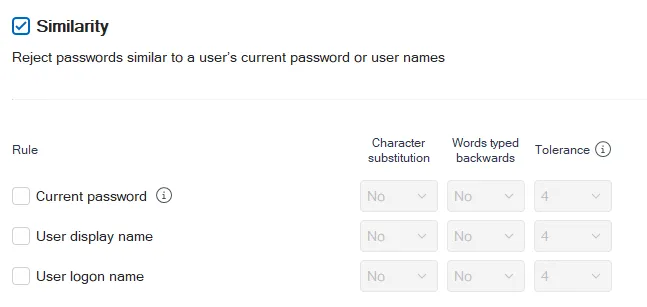
Select the Similarity checkbox at the top of the page, then select the types of similarity that you want Password Policy Enforcer (PPE) to detect:
-
Select the Current password checkbox if you want PPE to reject passwords that are similar to the user's current password. Password similarity may indicate that a user is serializing their passwords. For example, password1, password2, password3. Password serialization allows an attacker to predict future passwords.
-
Select the User display name checkbox if you want PPE to reject passwords that are similar to the user's Active Directory display name (full name for local accounts).
-
Select the User logon name checkbox if you want PPE to reject passwords that are similar to a user's logon name (user name).
Current password similarity detection only works when users change passwords from the Password Policy Client, Password Policy Enforcer Web, or Netwrix Password Reset. This feature doesn't store or transmit passwords or password hashes. It complements the History rule, but doesn't replace it because it only compares the current password with the new one.
Select Yes from the corresponding Character substitution dropdown if you want PPE to apply character substitutions when checking passwords.
Select Yes from the corresponding Words typed backwards dropdown if you want PPE to test passwords with their characters reversed. This stops users from circumventing this rule by reversing the order of characters in the similar password fragments. For example, PPE also evaluates the password emannogolym as mylogonname.
Select a value from the corresponding Tolerance dropdown to specify the maximum number of consecutive matching characters that PPE tolerates before rejecting a password. For example, the passwords oldpasswd and newpasswd contain six consecutive matching characters (shown in bold). PPE rejects the new password if the tolerance is five or lower, and accepts it if the tolerance is six or higher. The Auto value rejects passwords that contain the user's entire current password, display name, or logon name, respectively.