Domain and local policies
Netwrix Password Policy Enforcer (PPE) enforces password policies for both domain and local user accounts.
Domain user accounts exist in Active Directory. The domain controllers store information about these accounts and replicate changes among themselves.
Local user accounts exist in the Security Account Manager (SAM) database of workstations and servers. The workstations and servers can be standalone or domain members. The host computer stores information about these accounts locally and doesn't replicate it to any other computers.
A typical Windows network has both domain and local user accounts, but you might not want to enforce PPE policies for both account types. If your users normally log on with a domain account, you'll most likely only enforce password policies for domain accounts.
Installation differences
Install Password Policy Enforcer on all the domain controllers in the domain to enforce password policies for domain user accounts. You don't need to install it on read-only domain controllers unless you're using the Maximum Age rule, Password Policy Client, PPE Web, or Netwrix Password Reset.
To enforce password policies for local user accounts, install PPE on the computers that contain the user accounts you want to enforce password policies for. These computers can be workstations or servers, and they can be standalone or domain members. You don't normally need to install PPE on the workstations and servers in a domain because most users log on with a domain account. If this is the case, you'll most likely only need to install PPE on the domain controllers.
Operational differences
Most of Password Policy Enforcer's rules and features work with both domain and local policies, but there are some differences. These differences are due to password filter technical limitations, and also because some information isn't in the SAM. You can't use the following rules and features with local password policies:
- The Minimum Age rule and Maximum Age rule (you can still use the Windows versions of these rules).
- Policy assignments by groups and containers.
- The Password Scanner.
PPE stores configuration information in Active Directory for domain password policies, and in the Windows registry for local password policies. Click the Connected to selector in the PPE Configuration Console's home page to choose a configuration source.
Changes to a domain configuration automatically replicate to all domain controllers in the domain. Changes to a local configuration apply only to the local computer. If you want to use the same local configuration for many computers, export the HKLM\SOFTWARE\ANIXIS\Password Policy Enforcer 11.0\ registry key from the configured computer, and import it into the other computers.
You can also use Group Policy to distribute a local configuration to many computers in a domain. This is only necessary for local password policies. Domain password policies automatically replicate to the domain controllers because Active Directory stores them.
Distribute the local configuration with Group Policy
-
Start the Group Policy Management Console (gpmc.msc).
-
Expand the Forest and Domains items, then expand your domain in the left pane.
-
Right-click the Group Policy object you want to use, then click Edit...
-
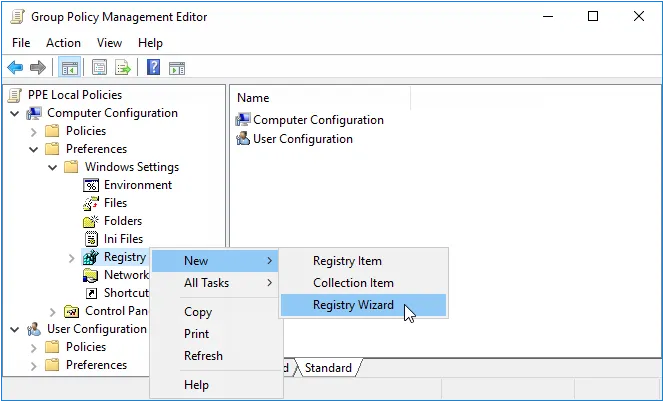
Expand the Computer Configuration, Preferences, and Windows Settings items in the left pane.
-
Right-click the Registry item, then select New > Registry Wizard.
-
Select the computer that contains the Password Policy Enforcer local configuration you want to distribute, then click Next.
-
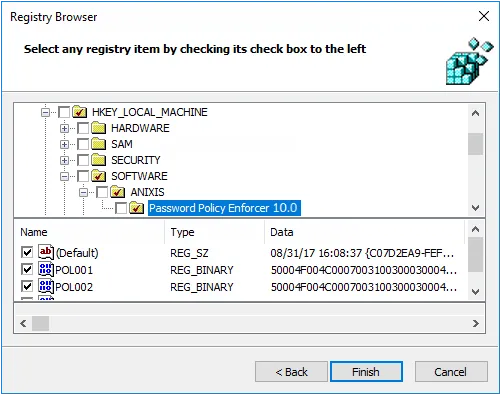
Expand the HKEY_LOCAL_MACHINE, SOFTWARE, and ANIXIS items.
-
Click the Password Policy Enforcer 11.0 item, then select the checkboxes beside each item in the bottom pane of the window.
-
Click Finish.
-
Close the Group Policy Management Editor.
Windows applies Password Policy Enforcer's local configuration to the target computers in the domain. This doesn't happen immediately, as Windows takes some time to apply the changes to Group Policy. You can force an immediate refresh of Group Policy on the local computer with this command: gpupdate /target:computer