Permissions for organisational structures
Relevance
These permissions primarily define which users/roles have what form of permissions for organisational structures. In addition, there are two mechanisms that directly build on the permissions for organisational structures.
- Limiting visibility: It was already explained in the section on Visibility that selectively withholding information is a very effective Protective mechanisms. Configuration of the visibility is performed directly when issuing permissions to organisational structures.
- Inheriting permissions for records: Inheritance from organisational structures is defined as a system standard. This means that there is no difference between the permissions for an organisational structure and the permissions for data that is stored in these organisational structures.
The way in which permissions for organisational structures are designed thus effects the subsequent work with Netwrix Password Secure in many ways. The following diagram describes these interfaces.
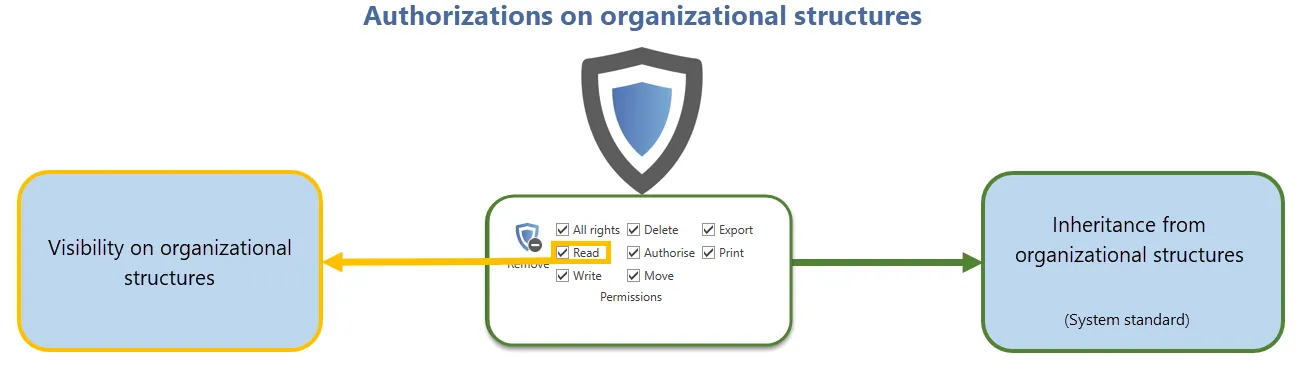
Permissions
The visibility and also inheritance mechanisms aren't considered in this section. This section exclusively deals with permissions for the actual organisational structure. It deals with which users and roles have what form of permissions for a given organisational structure. Permissions for organisational structures can be defined via the ribbon or also the context menu that is accessed using the right mouse button. A permissions tab appears:
The basic mechanisms for setting permissions is described in detail in the Authorization concept.
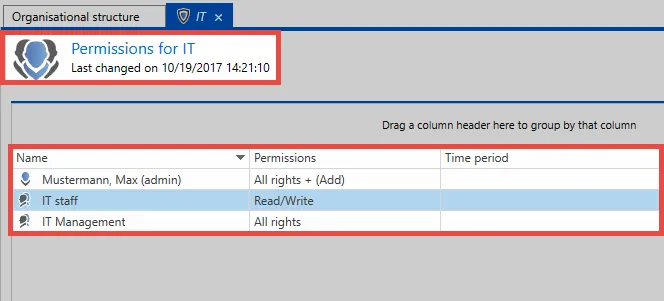
It is important that the permissions displayed here are interpreted correctly. The example shows the permissions for the "organisational structure IT".
The user Max Muster possesses all rights to the organisational structure IT, and can thus edit, delete, and also grant permissions for this structure.
The add right
The "add" right holds a special position amongst the available rights because it doesn't refer to the organisational unit itself but rather to data that will be created within it. In general, it is fair to say that to add objects in an organisational unit requires the add right. If a user wants to add a new record to an organisational unit, the user requires the add right. In the previous example, only the administrator has the required permissions for adding new records. Even the IT manager – who possess all other rights to the organisational structure "IT" – doesn't have the right to add records.
The add right merely describes the right to create objects in an organisational unit.