Data Retention
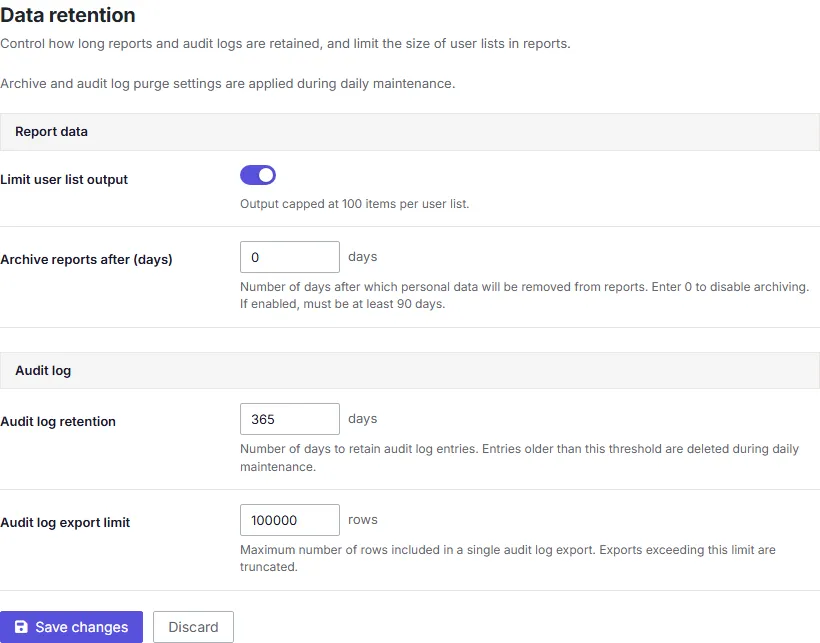
The Data retention screen controls how long PingCastle Enterprise keeps generated data.
Changes to these settings take effect within about 30 seconds, without a restart.
- Limit user list output — A toggle that caps the number of user rows included in a generated HTML risk report. Large domains can produce reports with thousands of affected users; capping the list keeps the report manageable to open and read. When you turn it on (the default), the report lists a maximum of 100 users. When you turn it off, the cap raises to 10,000 users rather than becoming unlimited.
- Archive reports after (days) — How many days after a report completes before PingCastle Enterprise moves it to archived storage. Minimum 90 days. Clear this value to disable archiving.
- Audit log retention (days) and Audit log export row limit — Control how long PingCastle Enterprise keeps audit log entries and how many rows a single export can contain. See Audit Log for what the audit log tracks and how it's structured.
How archiving works
Archiving converts "Full" detail level reports to "Normal" detail level, removing personal data while preserving summary statistics and scores. You can't reverse this one-way transformation.
- Automatic Execution
- Manual Execution
The archiving process runs automatically every day at 8:00 AM:
- PingCastle Enterprise processes all "Full" detail level reports older than the configured delay.
- The process removes personal data while maintaining domain scores and summary statistics.
- The process runs in the background without user intervention.
You can manually trigger archiving on-demand:
- Go to Database Management > Archive Reports (
/Database/ArchiveReports). - Specify the number of days (minimum 90).
- Confirm the action on the confirmation page.
- Monitor the progress bar during execution.
note
Manual archiving requires the admin role or a role with the "ManageDecryptionKey" or "ManageInteroperability" permission.
What gets archived:
- Reports with
ReportDetailLevel = "Full"older than the configured delay. - PingCastle Enterprise strips personal data from the reports.
- PingCastle Enterprise converts the reports to "Normal" detail level.
- Domain scores, statistics, and summary data stay intact.