Scanners
PingCastle includes built-in scanners to check for specific security configurations and vulnerabilities across domain computers. Scanners are accessible from the interactive menu or via command line.
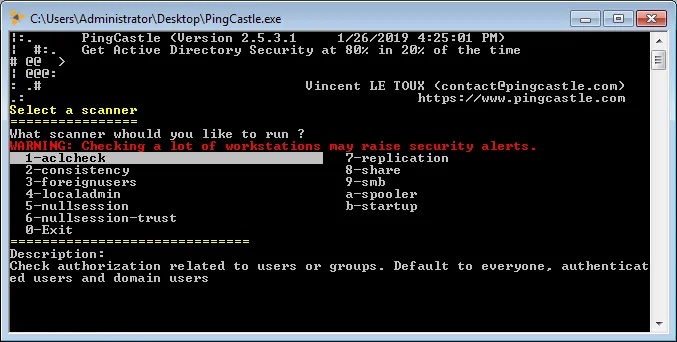
warning
Scanning large numbers of workstations may trigger security alerts.
Available Scanners
| Scanner | Description | Command |
|---|---|---|
| aclcheck | Check authorization related to users or groups against Active Directory ACLs (default: Everyone, Authenticated Users, Domain Users) | PingCastle.exe --scanner aclcheck --server <domain> |
| antivirus | Check for computers without known antivirus installed | PingCastle.exe --scanner antivirus --server <domain> |
| computerversion | Get the version of computers to detect obsolete operating systems | PingCastle.exe --scanner computerversion --server <domain> |
| foreignusers | Enumerate users in denied domains (e.g., bastions) via trusts using MS-LSAT | PingCastle.exe --scanner foreignusers --foreigndomain <domain|sid> --server domain controller |
| kerberoschecksumhotfix | Check MS14-068 vulnerability by analyzing KB3011780 installation status | PingCastle.exe --scanner kerberoschecksumhotfix --server <domain> |
| laps_bitlocker | Check if LAPS and/or BitLocker has been enabled for domain computers | PingCastle.exe --scanner laps_bitlocker --server <domain> |
| localadmin | Enumerate local administrators on computers | PingCastle.exe --scanner localadmin --server <domain> |
| nullsession | Check if null sessions are enabled and provide examples | PingCastle.exe --scanner nullsession --server <server> |
| nullsession-trust | Dump domain trusts via null session if possible | PingCastle.exe --scanner nullsession-trust --server <domain> |
| oxidbindings | List all IPs via OXID Resolver (DCOM) to find admin networks. No auth required | PingCastle.exe --scanner oxidbindings --server <domain> |
| remote | Check if remote desktop solutions are installed | PingCastle.exe --scanner remote --server <domain> |
| share | List all shares and determine if accessible by anyone | PingCastle.exe --scanner share --server <domain> |
| smb | Scan for SMB versions available and check if SMB signing is active | PingCastle.exe --scanner smb --server <domain> |
| smb3querynetwork | List all IPs and interface speeds using SMB3 (auth required) | PingCastle.exe --scanner smb3querynetwork --server <domain> |
| smbhotfix | Check MS17-010 (EternalBlue/WannaCry) vulnerability status | PingCastle.exe --scanner smbhotfix --server <domain> |
| spooler | Check if the spooler service is remotely active (exploitable with unconstrained delegation) | PingCastle.exe --scanner spooler --server <domain> |
| startup | Get last startup date to determine if patches have been applied (Legacy) | PingCastle.exe --scanner startup --server <domain> |
| zerologon | Test for ZeroLogon vulnerability (must be run from inside the domain). Note: This only performs the check and has no destructive actions | PingCastle.exe --scanner zerologon --server <domain> |
Scanner Options
Use these additional options to control scanner behavior:
--scmode-all- Scan all computers (default)--scmode-single- Check one single computer--scmode-workstation- Check workstations only--scmode-server- Check servers only--scmode-dc- Check domain controllers only--scmode-file <file>- Use computers listed in a file--nslimit <number>- Limit number of users to enumerate (default: unlimited)--services <names>- For antivirus scan, include these service names as antivirus services (comma-separated)