Finding and Fixing GPOs with PolicyPak DLL Orphans
If someone deletes the DLL for a GPO (either within the Central Storage or Local Store), when you're editing the GPO you'll see the error shown In the figure shown.
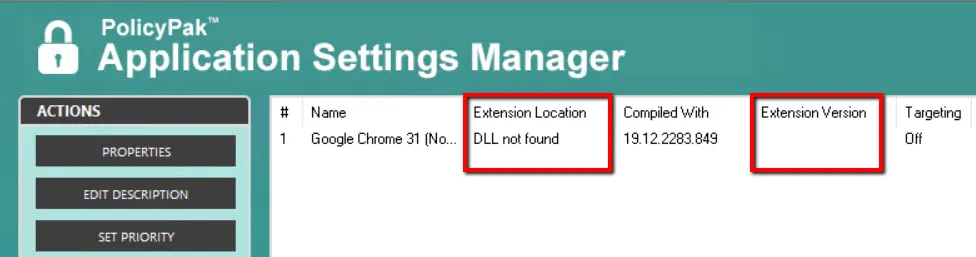
The figure shown. If the DLL is deleted for a GPO, an error will be shown.
This means the AppSet settings are not editable until the DLL is replaced in either the Local Store or Central Storage. This is called a PolicyPak DLL Orphan.
To help you quickly find all instances where this occurs, the PolicyPak GPOTouch utility can locate all PolicyPak DLL Orphans and rectify the situation. You can see the PolicyPak GPOTouch utility In the figure shown.
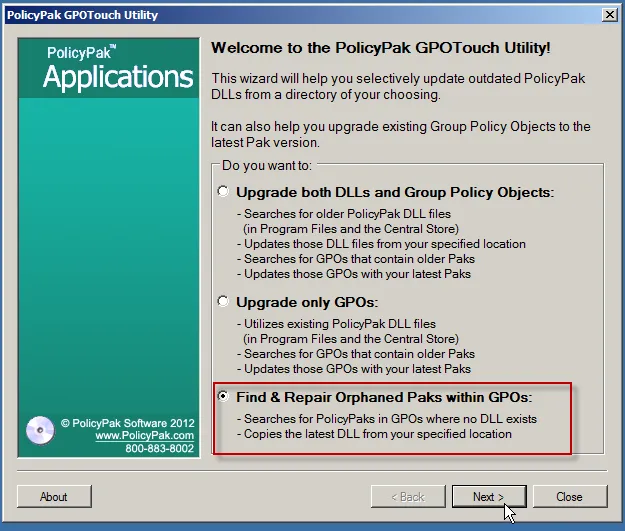
The figure shown. The PolicyPak GPOTouch utility can find and repair orphaned Paks within GPOs.
You simply need to have the original PolicyPak DLL for your project and the PolicyPak GPOTouch utility will copy the DLL into the Central Storage (or Local Store) and remediate the GPO.
To see an overview of the PolicyPak GPOTouch utility repairing PolicyPak DLL Orphans, please watch this video: Understanding and fixing PolicyPak DLL Orphans.