Control Panel Items
Control panel items are some of the items you might want to deploy settings to and lock down with PolicyPak AppLock™. Control Panel items can be items such as the control panel for mouse, as shown In the figure shown, or items like the Adobe Flash Player Settings Manager or Internet Explorer Settings. These applications are special for PolicyPak Application Settings Manager, and as such, there is special procedure in order to lock them down. In short, do not use 64-bit machines to try to capture Control Panel applets. Figure 203 shows that PolicyPak DesignStudio sees the process as rundll32.exe when it is running on a 64-bit machine.
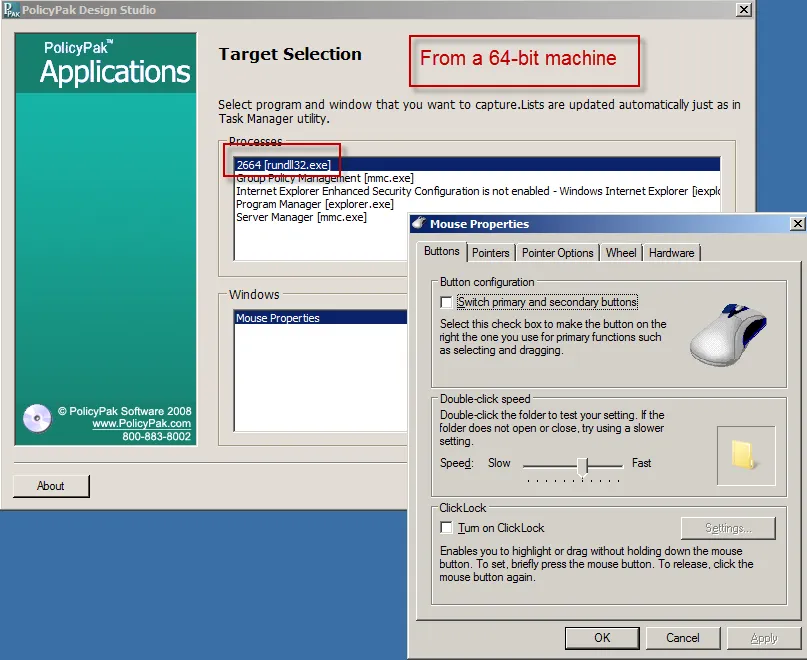
The figure shown. The Control Panel item when running DesignStudio on a 64-bit machine.
When PolicyPak DesignStudio is running on a 32-bit machine, can see that the Control Panel applet's name is being called by a CPL extension (See the figure here).
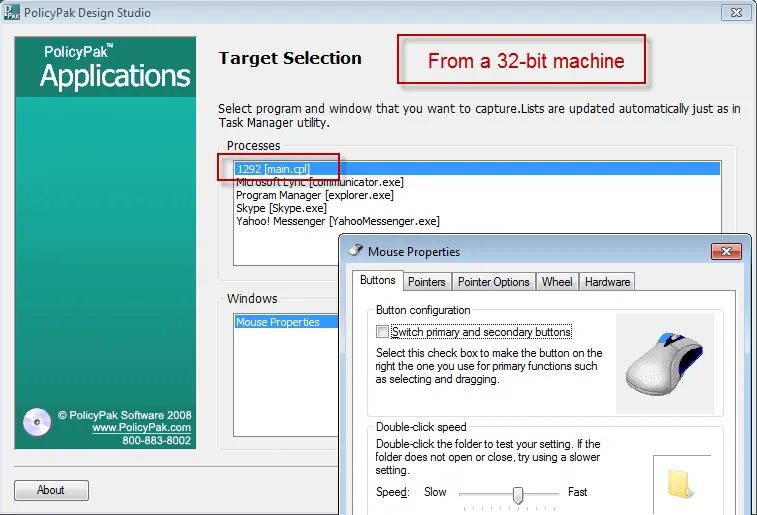
The figure shown. The Control Panel item when running DesignStudio on a 32-bit machine.
So, in short, if you would like to capture and edit Control Panel items, use PolicyPak DesignStudio on a 32-bit machine, and not a 64-bit machine. PolicyPak AppLock™ should work fine when deployed to both 32-bit and 64-bit machines of the same type (i.e., captured on Windows 7 and managed on Windows 7).