Using the .reg Importer Utility
For an overview of this section, see this video: Use the DesignStudio to import existing registry keys.
There might be times when you already have a .reg file (registry export) and want to use it within
Netwrix PolicyPak Application Settings Manager. By using PolicyPak Application Settings Manager instead of creating an ADM or ADMX file, you get all
the benefits of the PolicyPak Application Settings Manager engine, like delivering
anywhere and being able to revert when the setting no longer applies.
The .reg importer utility is only available to use with checkboxes. When you select any checkbox,
a special icon will appear, as shown In the figure shown.
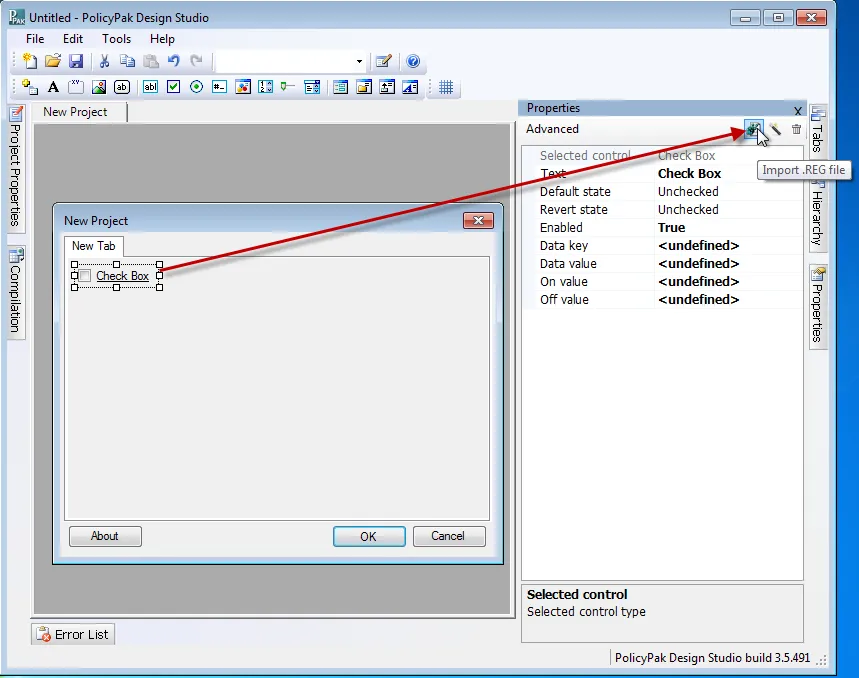
The figure shown. The .reg importer utility.
Using the utility, you can import existing .reg files and specify which state (checked or unchecked) matches which .reg file (See the figure here).
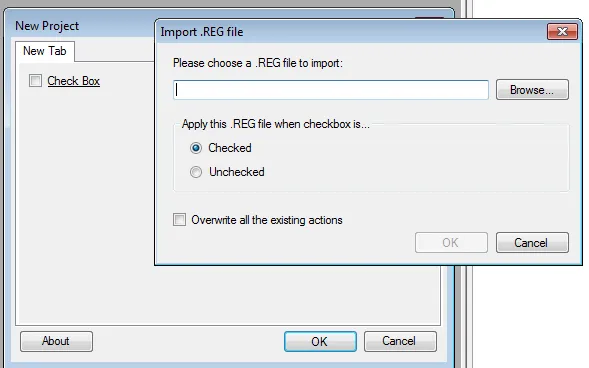
The figure shown. The .reg importer utility interface.
For a full end-to-end example on this mini-utility, please watch the video here: Use the DesignStudio to import existing registry keys.