Hyperlinks in Adobe documents do not work when Browser Router is set as the Default Browser
PROBLEM:
When using Adobe, URLs in PDF documents do not open in a web browser whenNetwrix PolicyPak Browser Router (PPBR) is set as the default browser.
CAUSE:
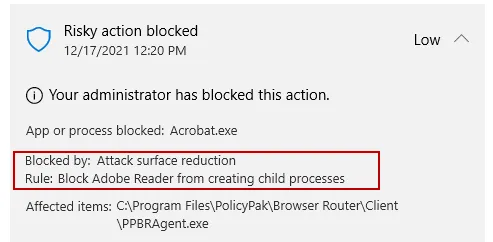
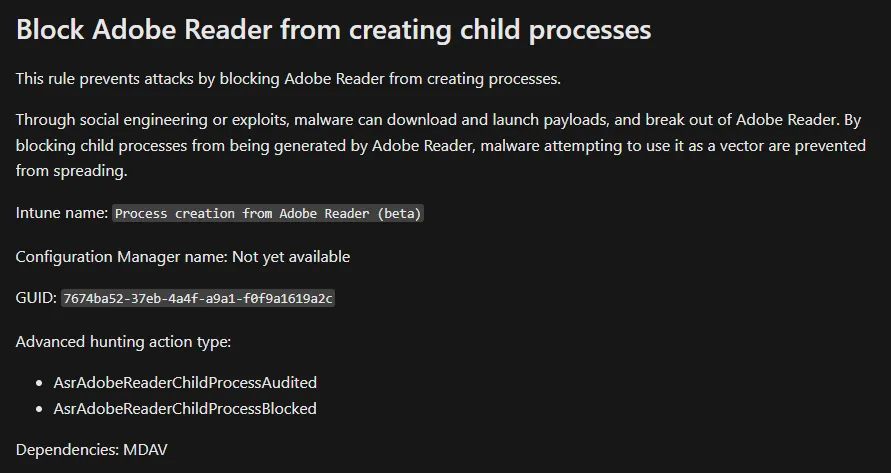
There is a Windows Defender Attack Surface Reduction Rule in place for Adobe:
RESOLUTION:
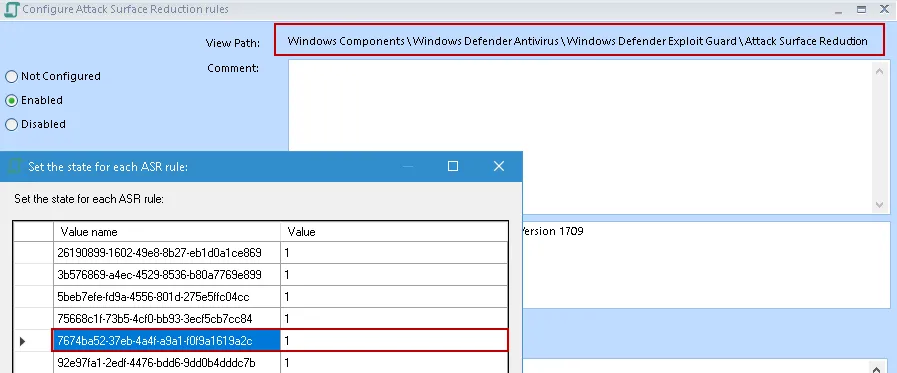
Option 1: Remove the Attack Surface Reduction Rule for Adobe by deleting the rule highlighted below.
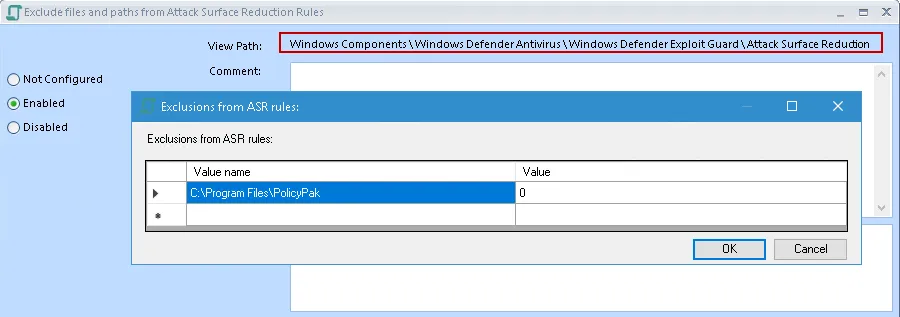
Option 2: (Recommended) Add exclusions for PolicyPak under "Exclude files and paths from Attack Surface Reduction Rules" policy.
If you prefer you can block only the PPBR Agent executable instead of the entire PolicyPak folder: "C:\Program Files\PolicyPak\Browser Router\Client\PPBRAgent.exe"
Excluding the "C:\Program Files\PolicyPak" folder, (or if you prefer just
"C:\Program Files\PolicyPak\Browser Router\Client\PPBRAgent.exe") should be enough to resolve the
issue with Adobe and Browser Router.
For a list of additional PolicyPak items that may need to be excluded please see the KB below:
How must I configure my Anti-virus or system-level software to work with PolicyPak CSE?