Discovery, Auditing, and Events
PolicyPakLeast Privilege Manager uses Windows event logs to generate interesting events that you can audit. You can use these events to audit what has occurred.
See the Events video for a demo of the PolicyPak Least Privilege Manager Events in action.
You can also use these events, before you fully roll out PolicyPak Least Privilege Manager, to discover what rules you would need to make when you transition from local admin rights to SecureRun™.
See the Use Discovery to know what rules to make as you transition from Local Admin rights video for a demo of PolicyPak Least Privilege Manager Discovery in action.
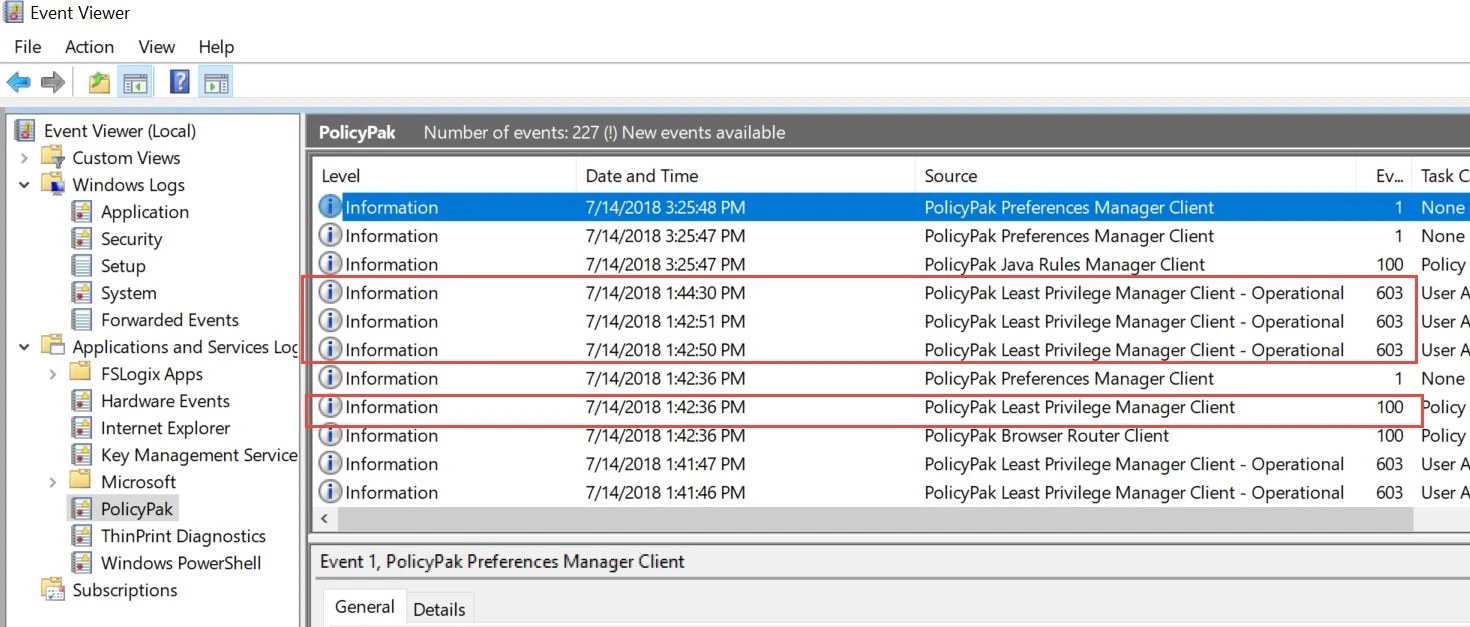
Events are logged on each endpoint machine and only when the interesting event occurs. You can find PolicyPak Least Privilege Manager events inside Event Viewer in the Application and Services folder and under the PolicyPak node. Once you get an understanding of PolicyPak Least Privilege Manager and events, you might want to set up event forwarding to capture and forward events from multiple machines. In this way you can see what multiple users are doing and look through the events for interesting ideas to convert into rules.
- See the How to forward interesting events for Least Privilege Manager (or anything else) to a centralized location using Windows Event Forwarding. topic to learn more about event forwarding.
- You can also use Netwrix Auditor to capture events from endpoints to bring them to a centralized source for investigation. See the How to use Netwrix Auditor to Report on PolicyPak events topic for additional information.
- You can use Azure Log Analytics to store PolicyPak Least Privilege Manager events. See the Windows 10 (and Server) Event Logs to Azure Log Analytics Walkthru topic for additional information.
- You can use PolicyPak Cloud to store PolicyPakLeast Privilege Manager events and make rules from stored events. See the PolicyPak Cloud + PPLPM + Events: Collect Events in the Cloudvideo for additional information.
PolicyPak Least Privilege Manager has two event sources, which can be seen in Event Viewer.
- PolicyPak Least Privilege Manager Client
- PolicyPak Least Privilege Manager Client—Operational