Least Privilege Manager (Windows)
About Netwrix PolicyPak Least Privilege Manager
Before reading this section, please ensure you have read the Installation Quick Start topics, which will help you learn to do the following:
- Install the Admin MSI on your GPMC machine
- Install the CSE on a test Windows machine
- Set up a computer in Trial or Licensed mode
- Set up a common OU structure
Optionally, this manual demonstrates how to use on-prem Active Directory and Group Policy to deploy PolicyPak Least Privilege Manager directives. If you don't want to use Group Policy, read the MDM & UEM Tools topics for additional information on how to deploy your directives.
PolicyPak Least Privilege Manager enables you to do the following:
- Get out of the risky business of giving users local admin rights.
- Shut the door on malware, crypto-malware, and zero-day exploits.
- Let non-admins safely install software they need, on-demand.
- Elevate specific scripts to run as needed (without insecurely embedding the script password inside the script file).
- Elevate specific Java JAR files to run in this way, as needed.
For instance, you don’t want to block your Standard Users from running applications that throw a UAC prompt. A Standard User doesn’t have the right permissions, and that’s where PolicyPak Least Privilege Manager can come in.
For more information on this issue, watch the Kill Local Admin Rights (Run applications with Least Privilege) video.
The basic way to use PolicyPak Least Privilege Manager is as follows:
-
Remove local admin rights from all users.
-
Create a rule to specify which applications, Control Panel applets, or other areas a user would need admin rights to.
-
Create a PolicyPak SecureRun™ rule to prevent all unknown applications from running (optional, but recommended).
-
Use On-Prem Group Policy to accept the PolicyPak Least Privilege Manager policies created. (This is what this guide will demonstrate.)
-
Alternatively, export the PolicyPak Least Privilege Manager rules and deliver them in one of these ways:
- Microsoft SCCM (See theDeploy PolicyPak Settings Using SCCM or Other Management System! video overview for additional information.)
- Microsoft Intune (See the Using Least Privilege Manager with your MDM service video overview for additional information.)
- Your own systems management software (PDQ Deploy or similar) (See the Deploying Apps that Require Admin Rights Using PolicyPak and PDQ Deploy video overview for additional information.)
- PolicyPak Cloud service (See the Use PolicyPak Cloud to deploy PP Least Privilege Manager rules video overview for additional information.)
Then allow the client machine with the PolicyPak client-side extension (CSE) to receive the directives and perform the work.
If you use an MDM service or PolicyPak cloud service, you can deliver PolicyPak Least Privilege Manager settings even to non-domain-joined machines over the Internet.
Least Privilege Manager Moving Parts
First thing is to understand the moving parts.
- A management station. The PolicyPak Admin Console MSI must be installed on the management station where you create GPOs. Once it’s installed, you’ll see the PolicyPak | PolicyPak Least Privilege Manager node, as shown below.
- The PolicyPak CSE. This runs on the client (target) machine and is the same CSE for all PolicyPak components (such as PolicyPak Least Privilege Manager, PolicyPak Device Manager, PolicyPak Application Settings Manager, etc.).
- Windows Endpoints. In order to use these, they must be licensed for PolicyPak Least Privilege Manager using one of the licensing methods.
- Mac Endpoints (optional). Mac endpoints must use PolicyPak Cloud to get PolicyPak Least Privilege Manager directives. See more in the PolicyPak Cloud for MacOS Client manual.
Also available is PolicyPak Cloud when you purchase PolicyPak Enterprise or PolicyPak SaaS.
PolicyPak Cloud enables you to create PolicyPakLeast Privilege Manager directives using the in-cloud editors and connect endpoints (Windows and Mac) to get PolicyPak Least Privilege Manager directives.
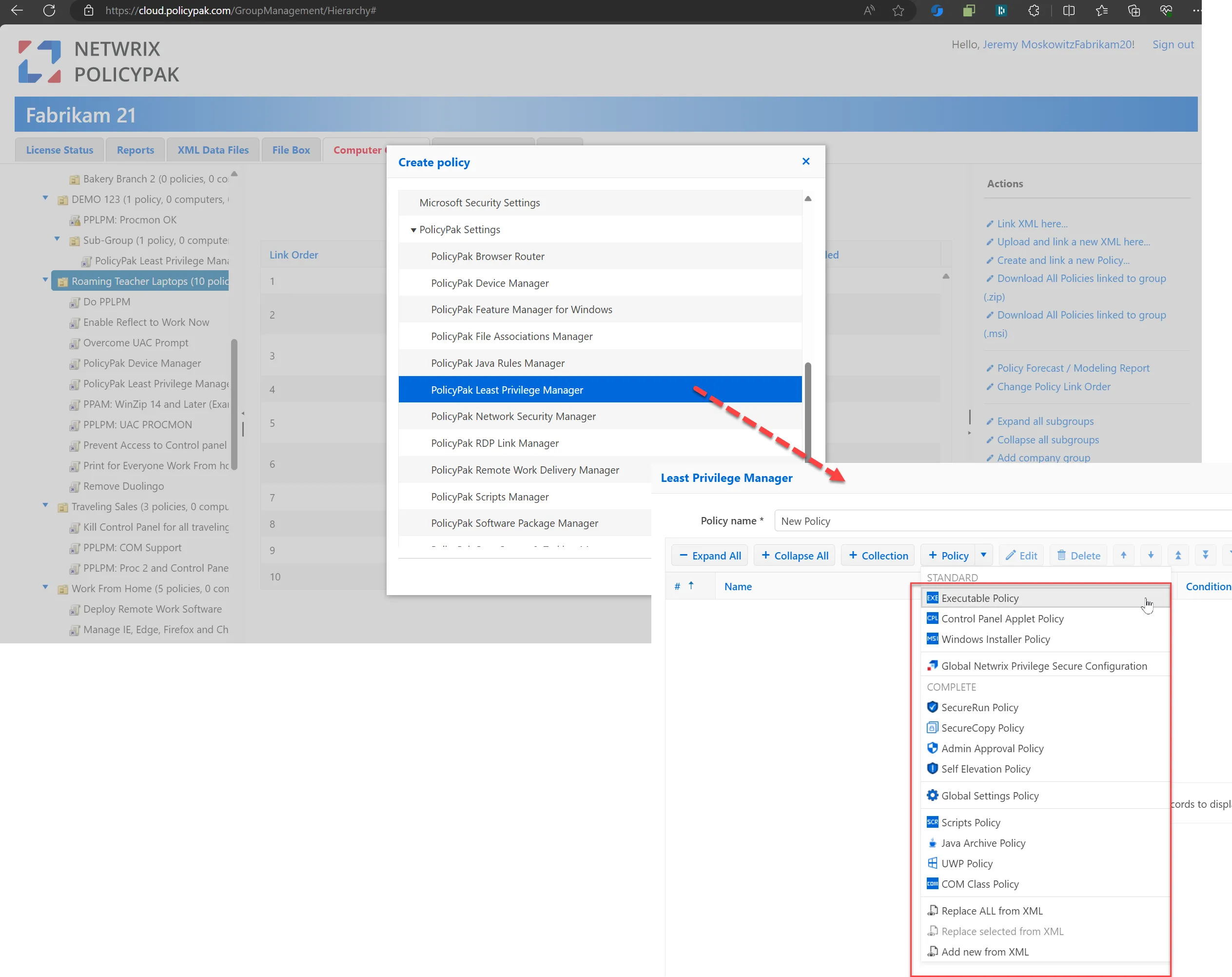
While this manual mostly demonstrates concepts using the Group Policy editor, nearly everything can be done using the in-PolicyPak-Cloud editors. Additionally, you can take on-prem MMC directives and upload them to PolicyPak Cloud, and take in-cloud directives and download them back as MMC directives.
Additionally, you may use PolicyPak Least Privilege Manager with any management system you like such as SCCM, Intune, PDQ deploy or anything else. This is because PolicyPak Least Privilege Manager directives may be exported as XML and wrapped up using the PolicyPak Exporter tool. This is a free utility that lets you take PolicyPak Admin Templates Manager and our other products’ XML files and wrap them into a portable MSI file for deployment using Microsoft Endpoint Manager (SCCM and Intune), or your own systems management software.
The MDM & UEM Tools topics explain how to use the PolicyPak Exporter to wrap up any PolicyPak directives and deliver them using Microsoft Endpoint Manager (SCCM and Intune), KACE, your own MDM service, or PolicyPak Cloud.
In other words, you are free to use any delivery methodof your choice with PolicyPak Least Privilege Manager.
This manual is designed to give you the basic concepts and operational scenarios you may encounter, but once you get those down, you are free to use whatever delivery method is best for your organization.