Getting Started: Client
If you already have the Netwrix PolicyPak CSE installed on your desired endpoint, great! That’s it, you’re done. However, in the Netwrix Privilege Secure download, you will also find the Netwrix PolicyPak CSE available within the Netwrix Privilege Secure download as a courtesy.
Therefore, you may use either the Netwrix PolicyPak CSE found either within the Netwrix Privilege Secure download, or the Netwrix PolicyPak CSE found in the Netwrix PolicyPak download.
See the Netwrix Privilege Secure Client - Getting Started with MMC with/without PolicyPak video for a demo on the relationship of the Netwrix Privilege Secure and Netwrix PolicyPak downloads and their moving parts.
It might be best to use the Netwrix PolicyPak CSE download since the Netwrix PolicyPak CSE download may have bugfixes, etc., which may not yet be available in the Netwrix Privilege Secure download due to lag time.
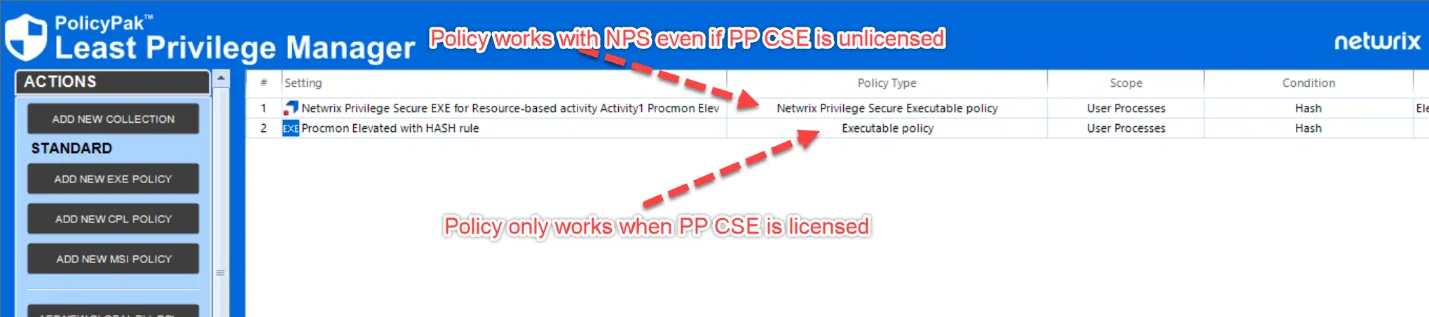
The interaction between Netwrix Privilege Secure and Netwrix PolicyPak CSE does notneed to be licensed. When you evaluate or purchase Netwrix Privilege Secure, the major Netwrix PolicyPak Least Privilege Manager management and elevation functions are automatically available to you without needing to install any specific endpoint license.
- The Netwrix PolicyPak Least Privilege Manager directives which are distributed as part ofNetwrix Privilege Secure server performing the brokering*will work even if unlicensed.
- The Netwrix PolicyPak specific items where there is no Netwrix Privilege Secure server involved require a license.
You can see the difference in the list view as seen here.
In the next section we will see how to create Netwrix PolicyPak + Netwrix Privilege Secure policies which will not need an endpoint license to work out of the box. Again, the idea is that you are already paying for an Netwrix Privilege Secure license, and because Netwrix Privilege Secure is involved in the policy, those policies work on the endpoint for free.