When rolling out PolicyPak Cloud, the Client Side Extension does not get installed with the Cloud Client on initial rollout
When rolling out a new installation of the Netwrix PolicyPak cloud endpoint software, the CSE may not get installed following the manual installation of the Cloud Client software. Any further attempts to re-install the Cloud Client have the same results.
Reason
One reason for this issue is a corrupt, incomplete, or otherwise malformed MSI of the Client Side Extension (CSE) cached on the client system. The file being present prevents it from re-downloading. The file being malformed prevents it from installing.
Verification
Review cached CSE installation file
Step 1 – In Windows Explorer, browse to folder
"C:\ProgramData\PolicyPak\Downloaded Installations\PolicyPak ClientSide Extension\xx.xx.xxxx"
(where xx.xx.xxxx represents the version of CSE being installed)
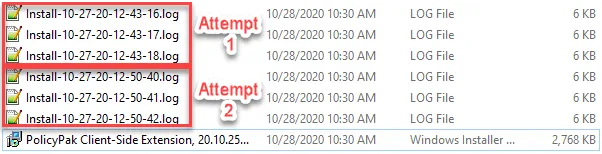
Step 2 – Compare size of file "PolicyPak ClientSide Extension, xx.xx.xxxx.msi" to the same file on other computers
The Install*.log file will only be approximately 6 KB instead of Usual 900+ KB
- There will sometimes be multiple logs files for each attempt
Resolution
To resolve this scenario:
Option 1:
Delete the malformed file and re-run the installation
Step 1 – Delete the malformed MSI
(C:\ProgramData\PolicyPak\Downloaded Installations\PolicyPak ClientSide Extension\xx.xx.xxxx\ PolicyPak Client-Side Extension, xx.xx.xxxx.msi"
Step 2 – Uninstall the "PolicyPak Cloud Client"

Step 3 – Rerun the installation of the Cloud Client
Step 4 – Verify both Cloud Client and Client Side Extension are installed
Option 2:
Manually install the Client Side Extension.
Download the CSE from the PolicyPak Portal
Step 1 – Browse to the portal and sign in
Step 2 – On the Home page, download the "Latest Bits" in the form of either a ZIP or ISO file

- Follow the prompts to complete the download.
Step 3 – Once downloaded, open or mount the file, open the "Client Side Extension (CSE)" folder and copy out the "PolicyPak Client Side Extension x??.msi"
Step 4 – Run the new MSI to install the CSE
Can be run from anywhere, does not have to be in the cached install folder above