Troubleshoot communication from the Cloud Client and Cloud Service
To test the connection between the client and service, start by entering the
PPCLOUD /SYNC command from the command line. If the return message is Could not sync with cloud,
the Netwrix PolicyPak Cloud client cannot communicate with
PolicyPak Cloud Server.
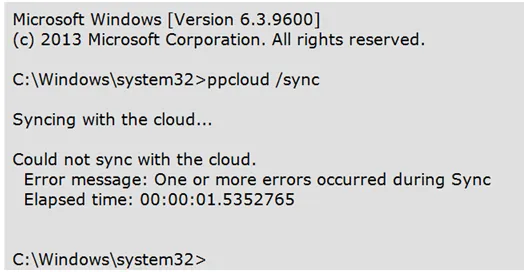
The main reasons for this connection issue are:
- No internet connection at all
- Internet connection behind a proxy server
- The Time and Date on the client is more than about 5 minutes off from the real time
Follow the steps below to troubleshoot the connection issue.
Step 1 – To test if the computer can reach PolicyPak Cloud, use Telnet from the affected (wait listed) machine and perform a Telnet test to the PolicyPak Cloud Service.
If you don't have Telnet on Windows, see this video on How to Enable Telnet on Windows 10 for additional information.
Step 2 – At a command prompt, type in the following: telnet cloud-agent.policypak.com 443

- If the command just hangs and takes a long time to complete, then comes back with Connection failed, then the communication failed i.
- If the command clears the screen and the cursor goes to the top, then the communication passes. See the image below for example.

Step 3 – You can also try telnet cloud-agent.policypak.com 80
- If the command just hangs and takes a long time to complete, then comes back with "Connection failed", then the communication failed.
- If the command clears the screen and the cursor goes to the top, then the communication passes.
Additional Considerations
- If the connection fails, that could mean there is some kind of proxy. To configure the proxy for the system, see the I always use a proxy and the cloud client cannot seem to make contact with the services (see FAQ Item #3 above first.) What else can I try? topic for additional information.
- If the connection passes, that could mean the Date and Time are wrong on the machine. First
manually try to correct the date and time. Then run
PPCLOUD /SYNCcommand and see if it succeeds. If that still fails to work, see the I am getting an error about "GPSVC failed at sign-in". This error occurs exactly one time. What does this mean? topic for additional information on alternative time fix instructions.