How do I fully reset my Azure AD connection between Azure and PolicyPak Cloud to start over?
If you're having issues getting Netwrix PolicyPak Cloud and Azure sync'd, here is what to try:
Step 1 – First, you need to be logged into your Azure account you're using FOR the configuration between PolicyPak Cloud and Azure.
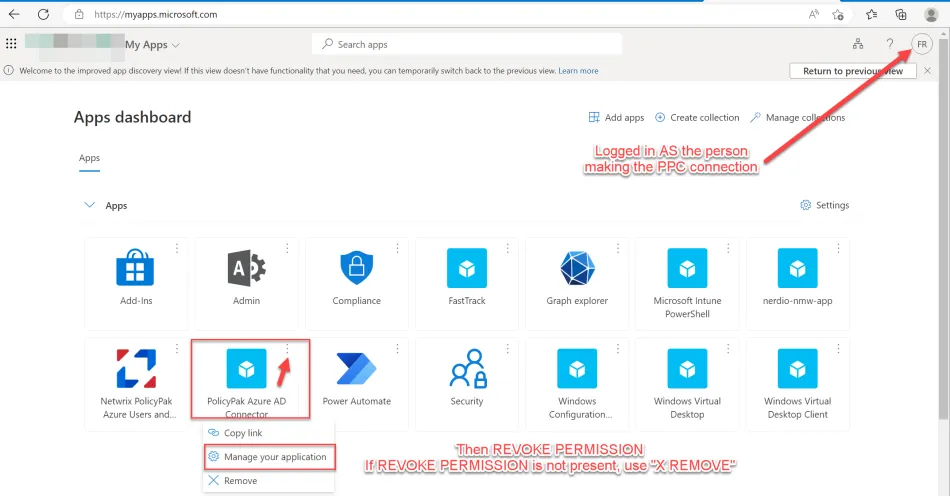
Step 2 – Navigate to https://myapps.microsoft.com/
Step 3 – Select "PolicyPak Azure AD Connector' application
Step 4 – Click "Manage your application"
Step 5 – Click "Revoke permissions"

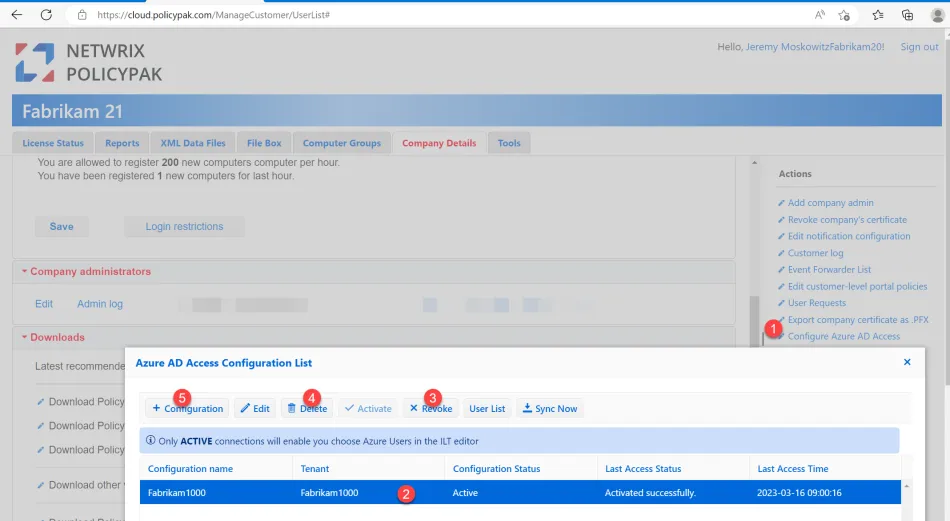
Step 6 – Then in PPC Portal:
- Create Azure AD configuration
- Activate Azure AD configuration
- Sync Azure AD configuration
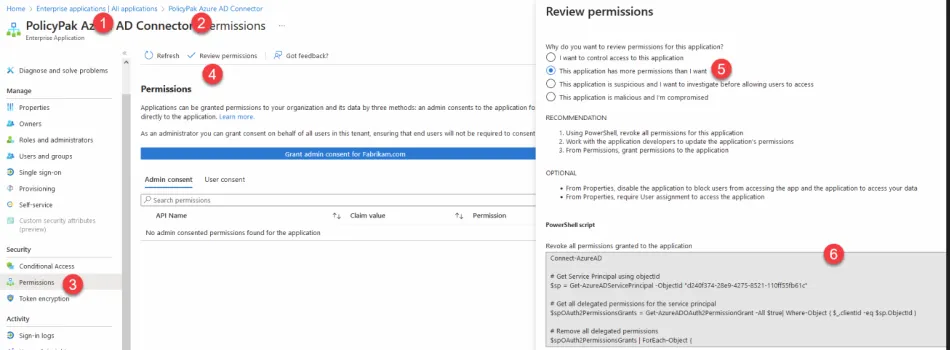
If that still doesn't work, you can force Azure to remove the PolicyPak application. The steps from Microsoft are here:
You can use a Powershell script and force remove the app and try again. Put the script below into block #6 as seen here.
Afterward, back in PolicyPak Cloud re-create the connection.
Connect-AzureAD
# Get Service Principal using objectId
$sp = Get-AzureADServicePrincipal -ObjectId "d240f374-28e9-4275-8521-110ff55fb61c"
# Get all delegated permissions for the service principal
$spOAuth2PermissionsGrants = Get-AzureADOAuth2PermissionGrant -All $true| Where-Object { $_.clientId -eq $sp.ObjectId }
# Remove all delegated permissions
$spOAuth2PermissionsGrants | ForEach-Object {
    Remove-AzureADOAuth2PermissionGrant -ObjectId $_.ObjectId
}
# Get all application permissions for the service principal
$spApplicationPermissions = Get-AzureADServiceAppRoleAssignedTo -ObjectId $sp.ObjectId -All $true | Where-Object { $_.PrincipalType -eq "ServicePrincipal" }
# Remove all delegated permissions
$spApplicationPermissions | ForEach-Object {
    Remove-AzureADServiceAppRoleAssignment -ObjectId $_.PrincipalId -AppRoleAssignmentId $_.objectId
}