What editors are there in PolicyPak Cloud (and when would I need a "Fake DC" to do editing?)
Part 1: Why we recommend a "Fake DC" and joined Windows 10 machine
First, we always recommend that PolicyPak Cloud customers have an “Fake DC” and joined Windows 10 machine via domain join for Testing Purposes.
The idea here is that if you can play with a Domain Joined Windows 10 PC to see how things work. It should always work with PolicyPak Cloud as well, but there are some exceptions.
Therefore, having a very small two computer test lab with a DC and joined Windows 10 machine is always advised.
Another easy option is to use VMware Workstation or Hyper-V to create a two computer test and export station.
For a good overview, you can check our videos on PolicyPakCloud, particularly the ones on requirements and procedures to get started. You can find the videos at the Video Learning Center
Part 2: MMC vs in-cloud editors
We are always making improvements and additions to PolicyPak Cloud with regard to in-cloud editors.
Before we show the current table of what is possible in PolicyPak Cloud editors, you should know that there will always be more things you can edit with the MMC snap-in editors than you can with PolicyPak Cloud.
For instance, we have PolicyPak Least Privilege Manager editors in both MMC snap-in and also in PolicyPak Cloud. But the advanced features of the PolicyPak Least Privilege Manager editor are only available in the MMC snap in, and are not scheduled to be in PolicyPak Cloud editors anytime soon.
Part 3: Known issues
Additionally, while most other editors will be ported over, we have decided we are not porting over PolicyPak Application Manager editor to PolicyPak Cloud. To make those kinds of policies, you will always need an editor station.
Part 4: XML "round trip"
Additionally, you should be able to take any PolicyPak Cloud XML and download it and use it within the MMC snap in and vice versa. Because the MMC editor will likely be more advanced than the PolicyPak Cloud editors, again, it’s strongly recommended you have an editing machine available to you in case some feature is not available in the in-cloud editor.
Part 5: PolicyPak in-Cloud Editors
This information is subject to change without notice. For an up to date verification of what is available simply log on to PPC and click Create and link a new Policy… and see what policy types are available to create.
Here’s an example. Black text are policy types which are available. Grayed out items are not available yet. Some policy types might be some percent complete, or might never be ported over at all.
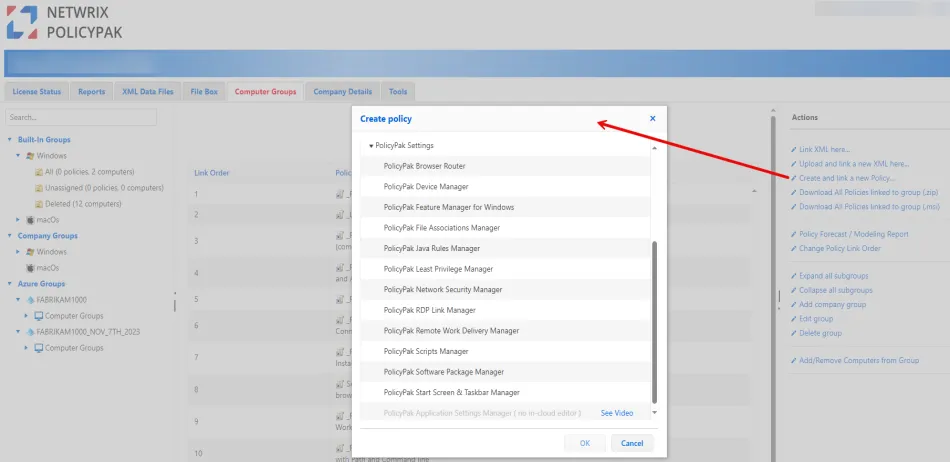
Lastly, here is the table of what’s currently in PolicyPak Cloud editors and our own self-assessed ranking of Percent complete.
The goal is to put the most important items in the PolicyPak Cloud editor, but keep in mind you may also need an editing station.
| Component | Percent Complete in PolicyPak Cloud | Notes |
|---|---|---|
| PolicyPak Application Manager | 0% | PolicyPak Application Manager support is NOT expected to be ported over to PolicyPak Cloud. |
| PolicyPak Admin Templates Manager / Microsoft Admin Templates / ADMX | 100% | You can also import your own ADMX files. |
| PolicyPak Security Settings Manager / Microsoft Group Policy Security Settings | 85% | All Security Settings supported EXCEPT: Wired Network, Wireless Network, Network List Manager, IP Security, Advanced Audit Policy,Restricted Groups |
| PolicyPak File Associations Manager | 100% | |
| PolicyPak Browser Router | 100% | |
| PolicyPak Scripts Manager | 100% | Full in-cloud PolicyPak Cloud editor |
| PolicyPak Least Privilege Manager | 85% | .EXE, SecureRun, Control Panel |
| PolicyPak Feature Manager for Windows | 0% | |
| PolicyPak Java Rules Manager | 100% | |
| PolicyPak Start Screen & Taskbar Manager | 0% | |
| PolicyPak Remote Work Delivery Manager | 50% | PP Cloud editors are special; but we will let you ADD / Upload on-prem policies, and they will work. But you cannot edit them in PP Cloud. Only ADD/REMOVE on-prem policies. |
| PolicyPak RDP Link Manager | 100% | |
| PolicyPak VPN Manager | 0% | |
| Group Policy Preferences Shortcuts | 100% | |
| Group Policy Preferences Drive Maps | 100% | |
| Group Policy Preferences Printers | 100% | |
| Group Policy Preferences Registry | 100% | |
| Group Policy Preferences Services | 100% | |
| Group Policy Preferences Environment Variables | 100% | |
| Group Policy Preferences Local Users and Groups | 100% | |
| Group Policy Preferences Scheduled Tasks | 100% | |
| Group Policy Preferences Environment Variables | 100% | |
| Group Policy Preferences Services | 100% | If a service isn't built-in, you should create the policy with on-prem editor first, then upload to PP Cloud. |
| Other Group Policy Preferences items | 0% |