Concepts, Logons, and Downloads
In this section, you'll learn about:
- The basic concepts of Netwrix PolicyPak Cloud
- Logging on to PolicyPak Cloud
- The PolicyPak Portal and downloading on-prem software from the Portal
- Setting up an on-prem test lab
It is very easy to get started with PolicyPak Cloud, and you can be up and running within minutes.
PolicyPak Cloud Concepts
PolicyPak Cloud is, at its core, a way to deliver directives (XML data files) from the PolicyPak Cloud service to client machines, where they are received and processed for the directives you have licensed. PolicyPak Cloud can be used with or without Active Directory.
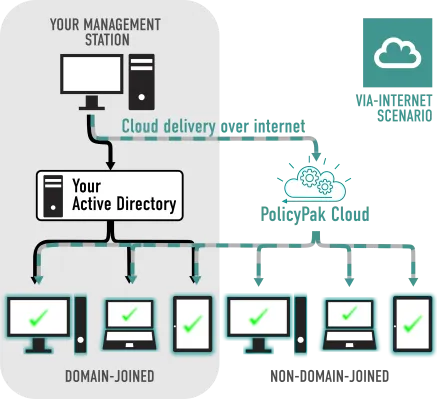
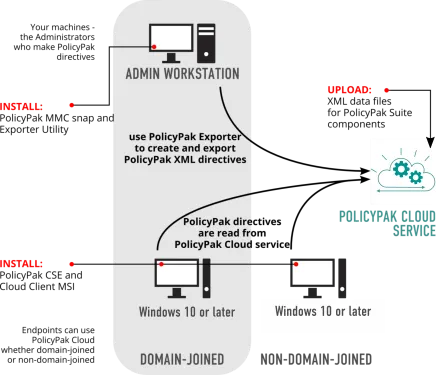
Below are some PolicyPak Cloud concepts:
- Admin management station - This is a Windows system which is able to create a directive. This Windows system connects to PolicyPak Cloud and uploads directives.
- Directives - These are files that contain instructions to perform work. All PolicyPak Cloud directives are XML data files you create.
- ComponentsThese are the various functions that PolicyPak can perform. For instance, PolicyPak Least Privilege Manager, PolicyPak Browser Router, and so on, are components.
- In-cloud editorsThese are graphical editors you can use within PolicyPak Cloud to create directives (XML data files).
- MMC editorThis is the same Admin Console tool an on-prem customer would typically use to create directives and deploy them via Group Policy Object (GPO). This is needed to create directives when there are no corresponding in-cloud editors.
- License poolThis is how many computers (maximum) you are licensed to use with PolicyPak Cloud.
- LicenseOne computer's use of PolicyPak Cloud.
- PolicyPak Cloud clientThe agent you install on a client computer to join your PolicyPak Cloud account and claim a license. It's the only thing you need to install on the client machine, and when you do, the client-side extension (CSE) will be automatically downloaded and will begin to process directives.
- PolicyPak CSEThis is the processing piece of PolicyPak. It is automatically downloaded after the PolicyPak Cloud client is installed on the machine. The CSE performs the work of processing Microsoft GPOs (as XML directives) and also PolicyPak directives (as XML directives).
- EndpointAny Windows machine running any currently supported version of Windows 10. The computer may or may not be domain-joined.
Operationally, there are no server requirements of any type with PolicyPak Cloud. You don't need to build anything to actually use PolicyPak Cloud. You can use PolicyPak Cloud with or without Active Directory. PolicyPak Cloud doesn't require Group Policy, SCCM, or any on-premise software. Remember: PolicyPak Cloud is the delivery mechanism for your policies.
With that being said, we strongly recommend you create a small on-prem test lab (more on this later) that contains one domain controller and one domain-joined Windows 10 machine. When you do this, you will be able to perform small-scale testing and troubleshooting (taking PolicyPak Cloud out of the equation if necessary). Additionally, because not all of PolicyPak's components have in-cloud editors, you may need to create directives using the MMC console first, then export them and use them with PolicyPak Cloud afterward. We go into this important topic in more detail later.
Tip: When you use the PolicyPak Cloud service, you can deliver any PolicyPak setting plus nearly any Microsoft Group Policy setting, even to non-domain-joined machines.