Creating an PolicyPak Cloud On-Prem Test Lab
As previously stated, there are many editors in PolicyPak Cloud for Microsoft Group Policy and PolicyPak specific directives. However, there will always be times where you must use the on-prem MMC console-based editor for some functions that can not be performed in the other editors. To get yourself set up perfectly with a small on-prem test lab, please perform the steps in the following videos:
- PolicyPak Cloud: What You Need to Get Started: PolicyPak Cloud: What you need to get Started
- How to Create a DC for Editing Purposes: How to create a DC for editing purposes.
- Testing and Troubleshooting by Renaming an Endpoint Computer: Testing and Troubleshooting By Renaming an endpoint Computer
- PolicyPak Cloud: On-Prem Test Lab: Tying it all Together: PolicyPak Cloud: On-Prem Test Lab (tying it all together)
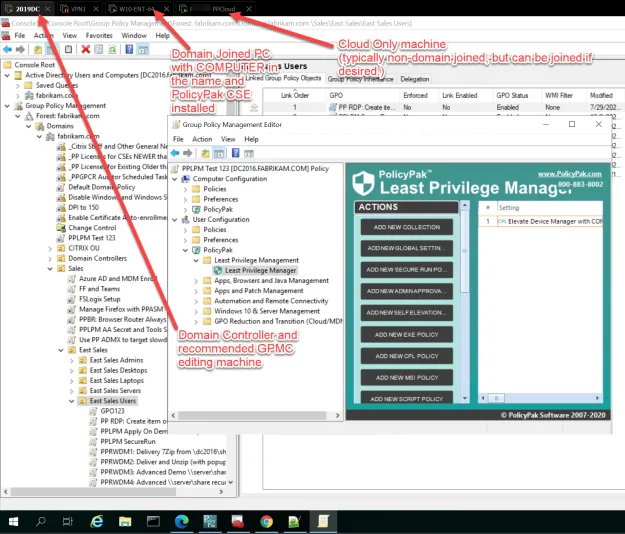
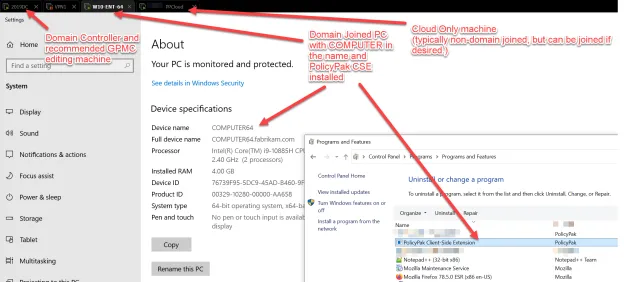
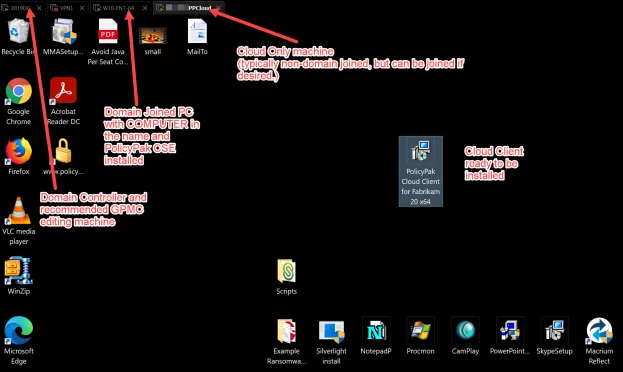
By the time you have completed the videos, you will have a mini, free-to-use on-prem test lab with the ability to create and edit all PolicyPak directives and test out that they are working. Below we have an example of a test lab using VMware Workstation with the following three machines (each one within a "tab" in VMware Workstation):
- Domain controller: Contains the GPMC and the PolicyPak Admin Console for editing
- Domain-joined PC: One machine with COMPUTER in the name
- Representative cloud machine: Typically non-domain-joined, but ready to install the PolicyPak Cloud client for continuous testing