Using PolicyPak with MDM and UEM Tools
Netwrix PolicyPak works with your mobile device management (MDM) service or unified endpoint management (UEM) tool as needed. This gives you the ability to wrap up Microsoft Group Policy and PolicyPak directives into an MSI and deploy them using the system you already use. However, these kinds of tools need to acquire the following three files to work with PolicyPak:
- PolicyPak client-side extension (CSE) MSI file (one for 64-bit machines and one for 32-bit machines)
- PolicyPak license MSI file
- PolicyPak exported directives wrapped up as an MSI file (can be one MSI file or multiple MSI files)
In the sections that follow, we'll explain how to use PolicyPak with any MDM or UEM tool you might already have.
Using PolicyPak with any UEM Tool
You can use PolicyPak with any UEM tool you already have like SCCM, LANDesk, KACE, etc. Figure 30 shows a systems flow when using PolicyPak with any UEM or systems management utility, like Microsoft Endpoint Configuration Manager (MEMCM) (formerly known as SCCM), KACE, etc.
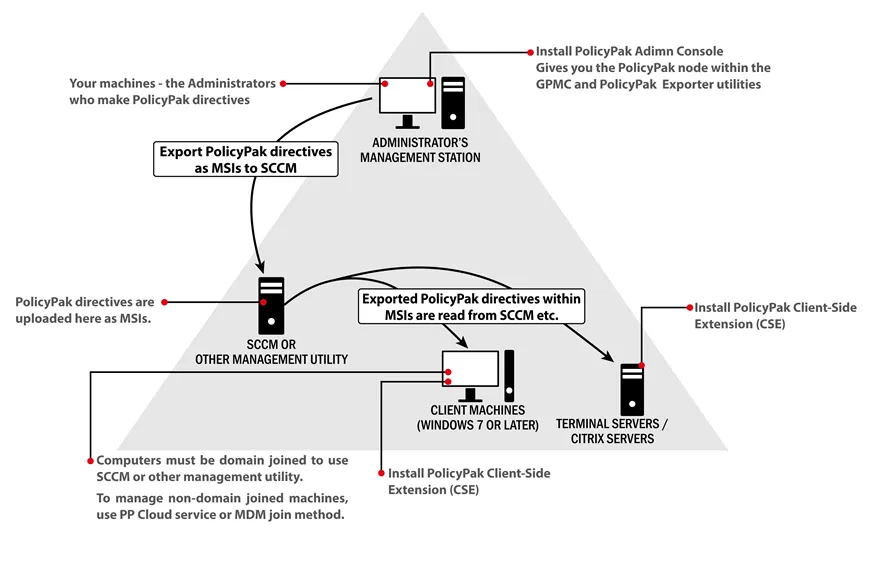
Figure 30. The correlation between applications and systems when using PolicyPak with any systems management utility.
For a series of videos to get started with PolicyPak and any UEM tool, like SCCM, KACE, etc., see the following link: Getting Started with PolicyPak (Misc) > Knowledge Base.