XML Data Files from PolicyPak Applications Settings Manager
If you have a Group Policy Object (GPO) with an existing PolicyPak Application Settings Manager directive within the GPO, you can use it to create XML data files.
note
If you don't already have a PolicyPak Application Settings Manager directive ready, you can use our PolicyPak Exporter utility to make one (which will be discussed next).
Step 1 – To utilize an existing GPO with a PolicyPak Application Settings Manager directive, right-click the directive containing your existing settings and select "Export settings to XMLData File," as shown in Figure 11. Then save the XML file for the next step.
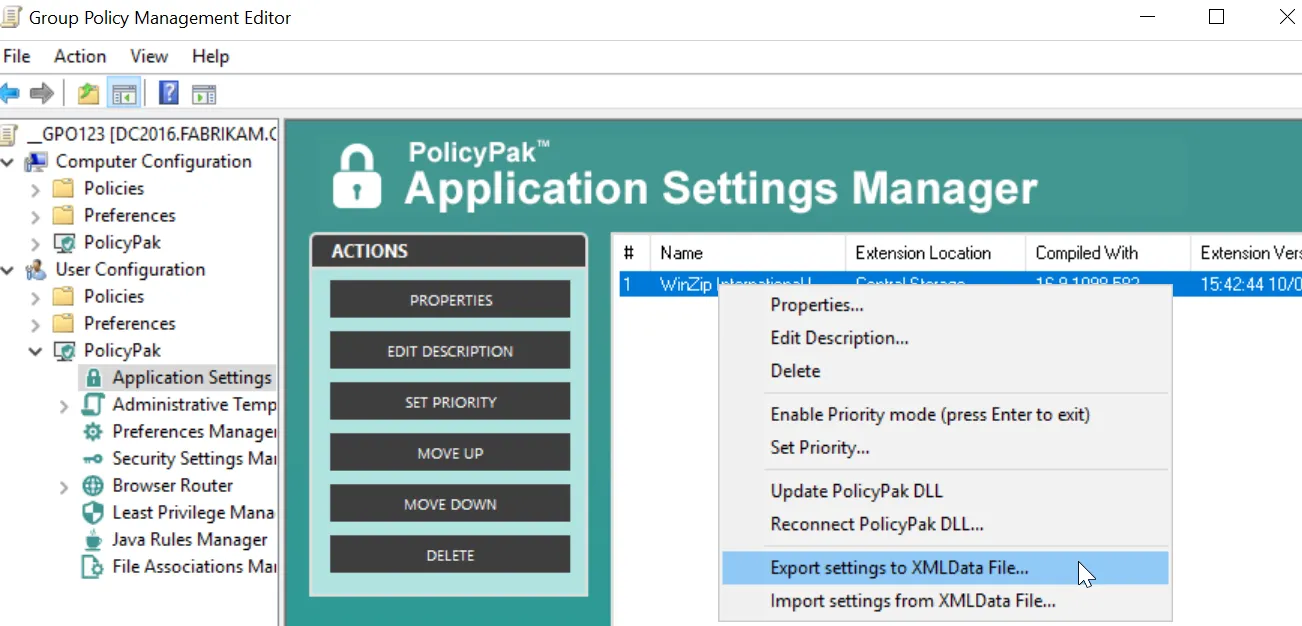
Figure 11. Using an existing GPO with a PolicyPak Application Settings Manager directive to select "Export settings to XMLData File."