How do I create a Secondary (or Accounting) contact within the Portal to enable another person to participate in PolicyPak (including downloads, updates, etc.)?
note
This article pertains to portal.policypak.com. If you need to manage users in the Netwrix PolicyPak Cloud Portal (cloud.policypak.com) see PolicyPak Cloud: Adding New Admins
There are three steps in the process:
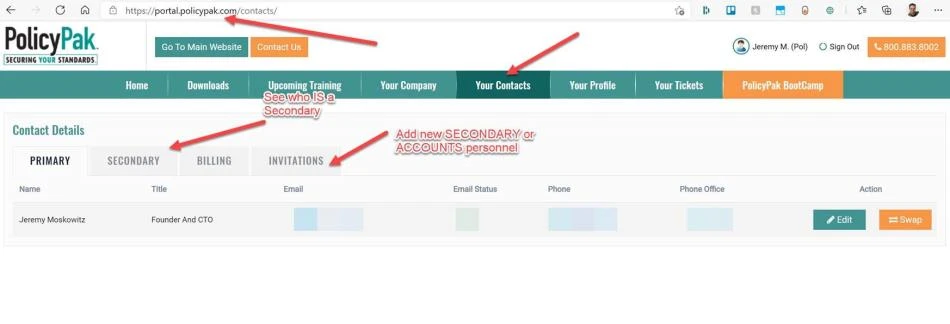
Step 1 – Your Primary must log on to the PolicyPak portal (portal.policypak.com).
Step 2 – Click on Your Contacts and then Secondary to see who is secondary.
Step 3 – You can then select Invitation to send Invites to new Secondaries or Accounting people.
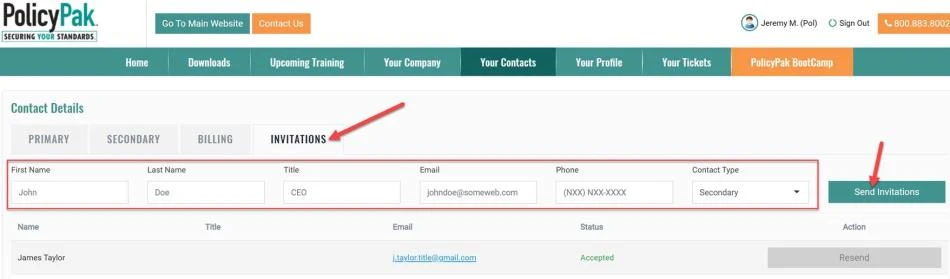
- Secondaries get technical AND renewal emails
- Accounting people get ONLY renewal emails
Finally, note that this does not add someone as another PolicyPak CLOUD admin. That function is exclusively within the CLOUD.policypak.com function.